Leitfaden zur Lohnabrechnung: So werden HR-Daten zu korrekten, pünktlichen Gehältern


Haftungsausschluss: Diese Inhalte dienen ausschließlich der allgemeinen Information und stellen keine Rechtsberatung dar. Leapsome übernimmt keine Garantie für die Einhaltung gesetzlicher Vorschriften und kann nicht bestätigen, wie einzelne Situationen vor Gericht bewertet würden. Wenn ihr euch nicht sicher seid, wie die Anforderungen auf eure Organisation zutreffen, wendet euch bitte an eine qualifizierte Rechtsberatung.
Bei nur wenigen Mitarbeitenden wirkt die Lohnabrechnung wie eine Nebensache. Sobald ein Startup zu wachsen beginnt, zeigt sich jedoch schmerzhaft deutlich, wie fehleranfällig die Lohnabrechnung tatsächlich ist.
Große Teams bedeuten mehr Daten, die HR sammeln und organisieren muss, ganz zu schweigen von komplexeren Compliance-Prüfungen. Kein Wunder, dass Unternehmen laut Daten von EY im Schnitt eine Fehlerquote von 20 % bei der Lohnabrechnung haben, wobei die Behebung jedes einzelnen Fehlers durchschnittlich $291 kostet.*
Fehler bei der Lohnabrechnung in kleinen Unternehmen liegen selten an der finalen Berechnung, sondern meist daran, dass Mitarbeiterdaten von Anfang an nicht korrekt gepflegt werden. Schauen wir uns an, wie HR die Daten, die in die Lohnabrechnung einfließen, so organisiert, dass die Qualität stimmt.
* EY, 2022
Was ist Lohnabrechnung, und warum ist sie wichtig?
Bei der Lohnabrechnung geht es nicht nur darum, pünktlich Geld auf die Konten der Mitarbeitenden zu überweisen. Es handelt sich vielmehr um einen durchgängigen Prozess, der mit der Berechnung der Vergütung und Steuern beginnt und mit der rechtskonformen Auszahlung endet.
Die meisten Abrechnungszyklen folgen, je nach Unternehmensgröße und Personalbedarf, einem von drei Zeitplänen:
- Wöchentlich: Unternehmen mit stunden- oder schichtbasierter Arbeit zahlen häufig wöchentlich aus, um stärker schwankende Vergütungen und häufige Planänderungen abzudecken.
- Zweiwöchentlich: Laut dem U.S. Bureau of Labor Statistics ist die Auszahlung alle zwei Wochen der häufigste Rhythmus, den 43 % der Arbeitgeber nutzen. Dieser Zyklus sorgt für einen gleichmäßigen Cashflow und erfordert weniger Verwaltungsaufwand als ein wöchentliches Modell.
- Monatlich: Eine einmalige Auszahlung pro Monat eignet sich oft für planbare Gehaltsrollen und ist der Zeitplan mit dem geringsten Aufwand für HR und Finance.
Dokumente und Anforderungen für die Lohnabrechnung
Bevor die Lohnabrechnung laufen kann, muss HR die erforderlichen Unterlagen sammeln und sich bei den zuständigen Steuerbehörden anmelden, damit jede Übermittlung euer Unternehmen rechtskonform hält.
Das bedeutet, zentrale Informationen zu sammeln, wie zum Beispiel:
- Steueridentifikationsnummern
- Steuer- und Berechtigungsformulare der Mitarbeitenden
- Bankverbindungen und Freigaben für Benefits
Ebenso entscheidend ist es, die Einordnung der Beschäftigten von Anfang an korrekt vorzunehmen, also festzulegen, ob es sich um Angestellte oder selbstständige Auftragnehmer handelt.
Wie funktioniert die Lohnabrechnung? Drei Schritte
Am besten lässt sich die Lohnabrechnung als wiederkehrender Zyklus mit drei klar getrennten Phasen verstehen.
1. Vor der Lohnabrechnung: Mitarbeiterdaten sammeln und prüfen
In der ersten Phase geht es darum, sicherzustellen, dass die Mitarbeiterdaten sauber sind, bevor sie in die Berechnung der Lohnabrechnung einfließen. Dafür gilt es:
- Einen Plan erstellen und die Grundlagen schaffen: Mit einem Rahmenwerk für alle künftigen Abrechnungszyklen legt ihr die Basis für Compliance. Neben der Festlegung von Auszahlungsrhythmen und Abzügen müsst ihr euch bei den relevanten Steuerbehörden anmelden.
- Infrastruktur für die Lohnabrechnung aufbauen: Laut einem Report von Strada nutzen 77 % der großen Arbeitgeber für Lohnabrechnung und Personalprozesse weiterhin veraltete Methoden wie manuelle Schecks und alte Backup-Systeme. Manuelle Lohnabrechnung wirkt durch geringere Anfangskosten attraktiv, kostet aber mehr Zeit und birgt ein höheres Fehlerrisiko. Automatisierte Software für die Lohnabrechnung reduziert diese Risiken durch integrierte Systeme, die Daten organisieren und mit den Compliance-Anforderungen abgleichen.
„Wenn man Daten von einem System ins andere kopiert, werden sie wirklich fehleranfällig.“
Erica Ancobia, CEO von KUNO
- Mitarbeiterdaten regelmäßig erfassen und aktualisieren: Die ständigen Änderungen bei Mitarbeiterdaten (Rollen, Gehälter, Benefits und Bankverbindungen) müssen in jede Lohnabrechnung einfließen. Legt klare Prozesse für die Vorbereitung der Lohnabrechnung fest, die regeln, wie und wann diese Informationen erfasst werden.
2. Lohnabrechnung durchführen: Zahlen berechnen und Gehälter auszahlen
Jetzt findet die eigentliche Lohnabrechnung statt, bei der eure Teams:
- Bruttogehalt, Abzüge und Nettogehalt berechnen: Mit allen Daten von HR kann die Lohnabrechnung Gehälter oder geleistete Arbeitsstunden (zuzüglich Boni oder Überstunden) anwenden und anschließend Steuern und Benefits abziehen, um das endgültige Nettogehalt jedes Teammitglieds zu ermitteln.
- Zahlungen auszahlen: Sobald alle Zahlen final freigegeben sind, werden die Gehälter an die Mitarbeitenden ausgezahlt, in der Regel per Überweisung auf ihr verknüpftes Bankkonto.
3. Nach der Lohnabrechnung: Abgaben zahlen und alles dokumentieren
Sobald die Mitarbeitenden bezahlt sind, müsst ihr weiterhin sicherstellen, dass ihr compliant seid und eine prüfsichere Dokumentation vorliegt.
Das bedeutet konkret:
- Lohnsteuern melden und abführen: Meldet und überweist alle während der Lohnabrechnung einbehaltenen Steuerbeträge an die zuständigen Behörden, wie die IRS sowie die Arbeits- oder Arbeitslosenbehörden der jeweiligen Bundesstaaten.
- Unterlagen zur Lohnabrechnung aufbewahren: Um euch für künftige behördliche Prüfungen abzusichern, bewahrt alle Daten zur Lohnabrechnung an einem zentralen Ort auf.
Leapsome ist kein Lohnabrechnungssystem, aber unser Lohnabrechnung-Portal vereint eure wichtigsten Daten, wie Mitarbeiterakten und Abwesenheiten, an einem Ort. So findet und organisiert HR alle Details mühelos vor dem Abgabetermin.
„Auf C-Level-Ebene habe ich gelernt, People-Daten zu misstrauen, weil sie zu spät kamen und sich in verschiedenen Dateien widersprachen. Dann, in der HR-Rolle, habe ich den Schmerz selbst gespürt und gesehen, wie viel Zeit in den Wiederaufbau derselben Reports floss. Zentralisierung stellt Vertrauen und euren Kalender wieder her.“
Florian Klages, Managing Partner bei torq.partners
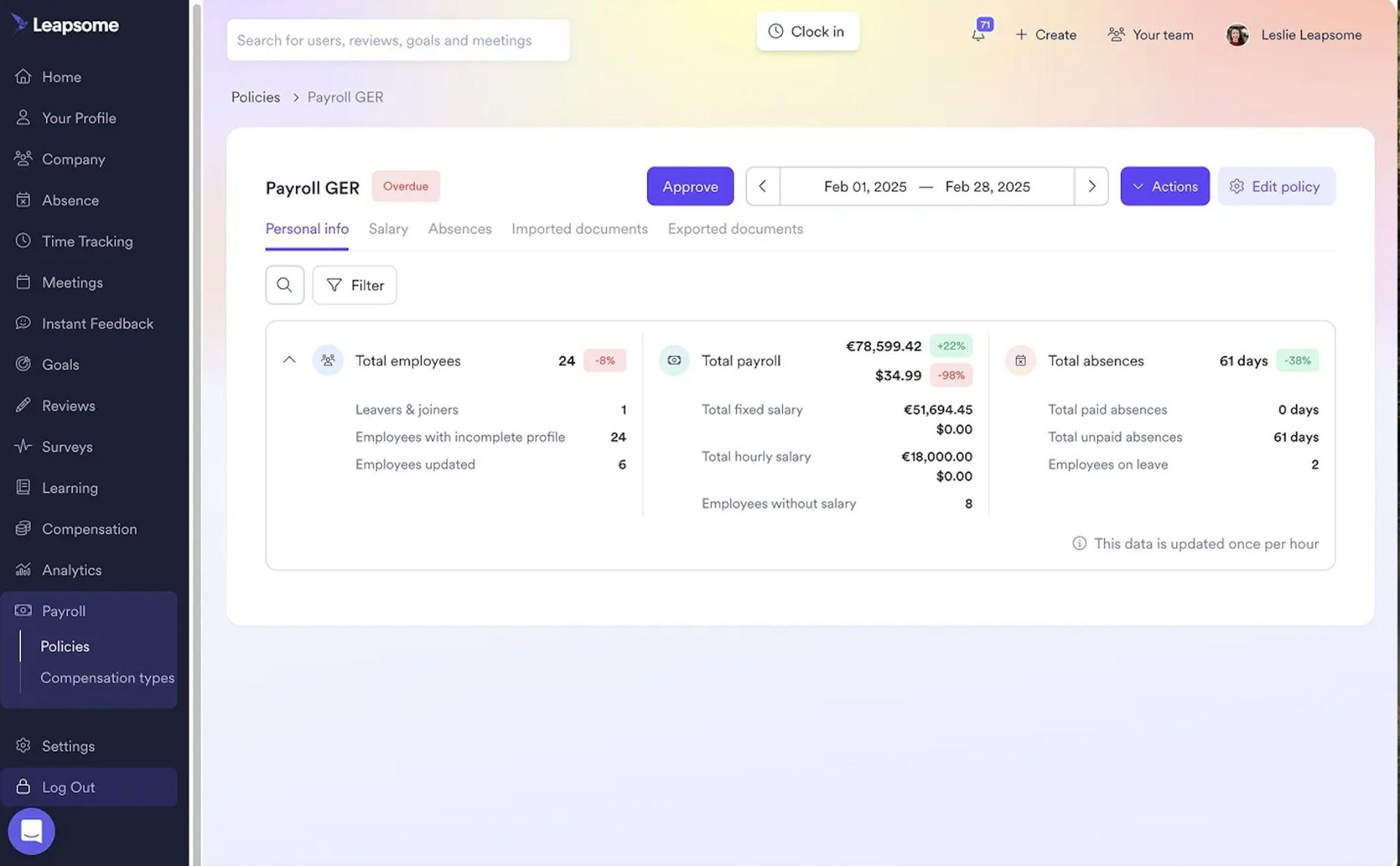
🔍 Datenprobleme erkennen, lange vor dem Abrechnungstag
Indem ihr alle wichtigen HR-Daten an einem Ort verbindet, hilft Leapsome euch, Abweichungen zu erkennen, bevor sie sich auf die Lohnabrechnung auswirken.
👉 Lohnabrechnung testen
Abrechnungsbereit versus Abrechnungstermin: Was HR vor jedem Lauf festlegen muss
Manche Zeitpläne für die Lohnabrechnung drehen sich nur um Fristen, ohne zu berücksichtigen, ob Teams wirklich „abrechnungsbereit“ sind. Das ist, als würde man ein Rennen ohne ordentliches Aufwärmen starten: Gab es Ungenauigkeiten in der Vorbereitung eures letzten Abrechnungslaufs, stolpert ihr mit ziemlicher Sicherheit vor der Ziellinie.
Daten von EY legen stark nahe, dass Probleme während der Lohnabrechnung meist auf schlechte Daten zurückzuführen sind. Die drei häufigsten Fehlerkategorien bei der Lohnabrechnung sind Zeiterfassung und Spesen, Urlaub/PTO/Krankheitstage sowie Benefits. Wenn die Lohnabrechnung ständig nach Last-Minute-Details fragt, etwa Bonusbestätigungen oder Änderungen an Mitarbeiterakten, wird es Zeit, die HR-Datenflüsse zu verbessern.
Eine Möglichkeit dafür ist, einen internen Stichtag festzulegen, den sogenannten Abrechnungsbereitschaftstermin. Dieser zusätzliche Termin legt fest, ab wann HR mit Sicherheit sagen können sollte, dass die Daten für die Lohnabrechnung vollständig und korrekt sind.
Ein Abrechnungsbereitschaftstermin verbessert eure Prozesse für die Lohnabrechnung, indem er Folgendes bietet:
- Klar definierte, sichtbare Fristen: Die Dringlichkeit einer klaren Frist lenkt die Aufmerksamkeit von HR darauf, wann Daten bereit sein müssen, sodass euer Team nicht in letzter Minute hektisch Anfragen nachkommen muss.
- Klare Verantwortlichkeiten für Daten: Eine Frist hält nicht nur HR verantwortlich, sie erspart euch auch viel Detektivarbeit. Klarheit darüber, wer für welche Eingabe in die Lohnabrechnung verantwortlich ist (zum Beispiel Mitarbeitende für die Änderung von Bankverbindungen und Führungskräfte für die Freigabe von Abwesenheiten und Boni), macht es leicht, bei Fragen die richtigen Personen zu finden.
- Höheres Vertrauen der Mitarbeitenden: Die Lohnabrechnung ist eines der sichtbarsten Versprechen, das ihr eurer Belegschaft gebt, und dasjenige, das Mitarbeitenden am wichtigsten ist. Laut Remote gaben rund 42 % der Mitarbeitenden an, dass Fehler bei der Lohnabrechnung ihr Vertrauen in den Arbeitgeber verringert, sie gegenüber dem Unternehmen vorsichtiger gemacht oder sie dazu gebracht haben, es sich zweimal zu überlegen, bevor sie andere Anliegen ansprechen.
Eine weitere Möglichkeit, sicherzustellen, dass HR immer abrechnungsbereit ist, ist die Zentralisierung der Mitarbeiterakten mit Leapsome. So behaltet ihr alle aktuellen Daten für die Lohnabrechnung, wie Abwesenheiten, PTO und Beförderungen, an einem Ort. Als zusätzlichen Vorteil liefert die höhere Transparenz über Personalkosten HR und Finance Daten für präzisere Prognosen und Entscheidungen.
„Viele HR-Teams kämpfen noch immer mit den Grundlagen: zu viele isolierte Tools, begrenzte Einblicke. Deshalb haben wir ein wirklich menschenzentriertes HRIS gebaut, das alle Mitarbeiterdaten in einer einzigen Quelle der Wahrheit vereint.“
Suraj Paneru, Customer Success Coach bei Leapsome
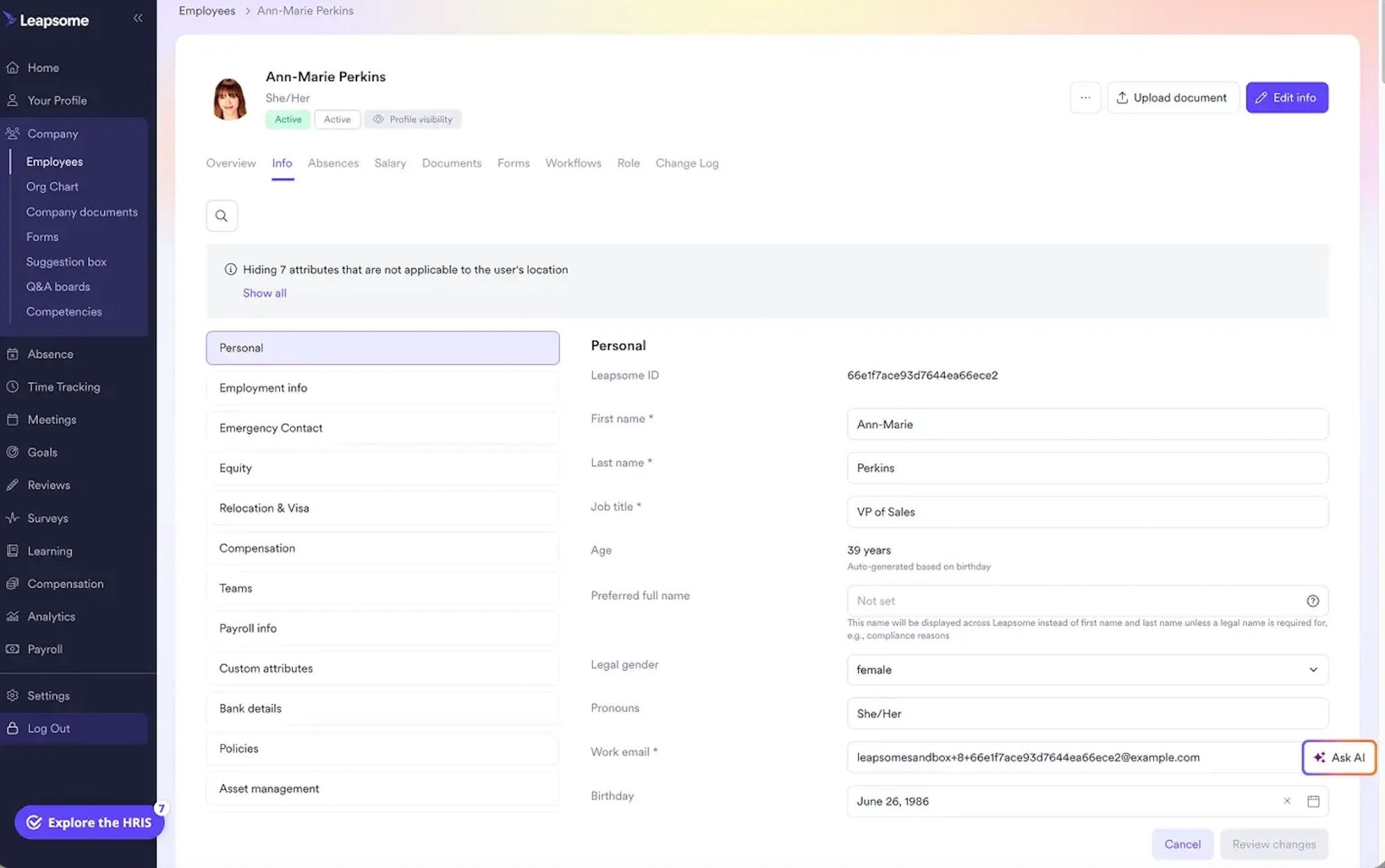
📁 Saubere Daten für sichere Abrechnungszyklen
Aktualisiert alle Mitarbeiterdetails, wie Gehälter und Verträge, im selben Portal, damit HR stets die richtigen Informationen liefert.
👉 Mitarbeiterakten entdecken
Lohnabrechnung sicher vorbereiten, dank Leapsome
Wachstum sollte nicht bedeuten, dass die Lohnabrechnung für alle zunehmend stressiger wird. Wenn das doch passiert, liegt es wahrscheinlich nicht an der Art, wie ihr die Lohnabrechnung durchführt. Vermutlich bereitet ihr sie einfach nicht gut genug vor. Statt beim Finance-Team oder eurem externen Dienstleister zu suchen, schaut euch genauer an, wie gut HR die Daten verwaltet, die in das Lohnabrechnungssystem einfließen.
Das zentrale HRIS und die People-Management-Plattform von Leapsome helfen euch, die Lohnabrechnung besser vorzubereiten, mit:
- Integrierten Mitarbeiterakten: HR muss nicht lange suchen, um alle aktuellen Änderungen an People-Daten zu finden.
- Tools für Abwesenheiten und Time Tracking: Synchronisiert Abwesenheits- und PTO-Daten direkt mit euren HR-Workflows und erkennt veraltete Abwesenheitseinträge.
- Automatisierter Compliance-Abgleich: Mit Leapsome legt ihr spezifische Regeln für euer Lohnabrechnungssetup fest, um rechtliche Risiken zu vermeiden.
„Mitarbeitende finden jetzt alles an einem Ort: ihre Daten, Abwesenheiten, Ziele und Reviews. Ich muss nicht mehr erklären, welches Tool wofür genutzt wird. Es ist alles in Leapsome.“ Merilyn L, Senior People Operations Specialist bei Bob W.
✅ Sauberere Eingaben für die Lohnabrechnung, statt mehr Korrekturen
Helft HR, jederzeit organisiert und aktuell zu bleiben, mit der einzigen Quelle der Wahrheit von Leapsome.
👉 Demo anfragen




.png)