Time-Tracking-Apps machen mehr als Stunden aufzeichnen. Sie helfen Mitarbeitenden, produktiv, verantwortungsvoll und auf Kurs zu bleiben.
Einfache Time-Tracking-Tools funktionieren für kleine Teams gut. Wachsende Unternehmen brauchen aber oft umfassendere Lösungen, die mehrere Apps zusammenführen. Optionen mit integrierten HR-Funktionen, etwa Mitarbeiterdaten-Management, Abwesenheitsmanagement und People Analytics, sind dann ideal.
Und mit 85 % der HR-Verantwortlichen, die unter Druck stehen, Kosten zu senken*, hilft ein intelligenter, verschlankter Tech-Stack, Kosten zu reduzieren. Ohne Produktivitätseinbußen.
Damit ihr die beste Time-Tracking-Lösung für euer Unternehmen findet, haben wir die sieben besten Time-Tracking-Apps für Mitarbeitende am Markt aufgelistet. Wir haben Nutzer-Bewertungen genau geprüft. Der Artikel bringt echte Kundeneinblicke, Vor- und Nachteile sowie beste Use Cases.
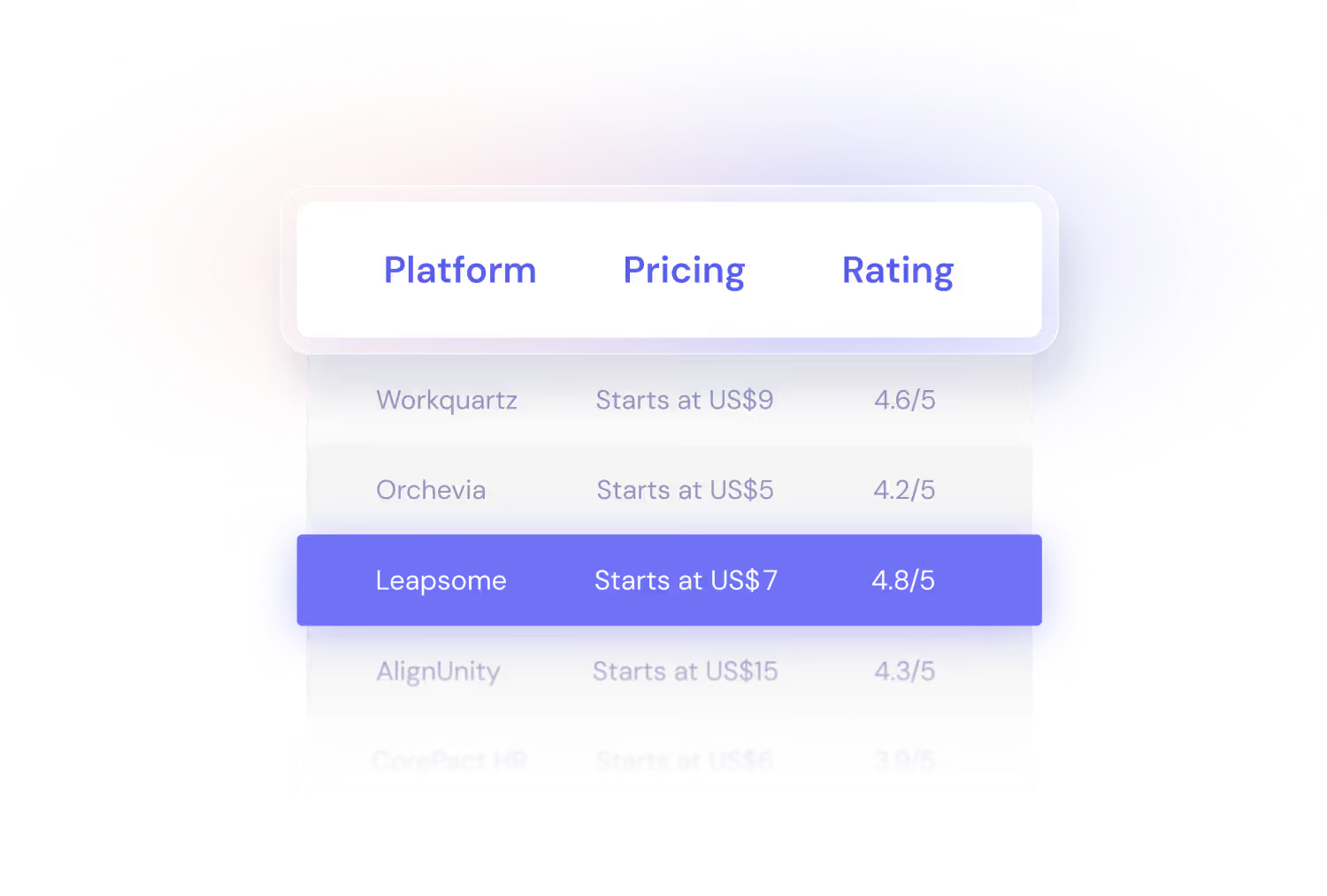
Überblick: die besten Time-Tracking-Apps für Mitarbeitende auf einen Blick

*Leapsome Workforce Trends Report, 2024
Die folgenden Informationen basieren auf unserer Recherche im Januar 2025. Alle im Text erwähnten Nutzer-Feedbacks stammen aus unabhängigen Software-Bewertungsplattformen (wie G2 und Capterra) und wurden im Januar 2025 erhoben.
1. Leapsome

Wichtigste Funktionen
- Time Tracking und Stundenzettel für Mitarbeitende: Teammitglieder erfassen Arbeitsstunden und Pausen einfach und im Rahmen der Unternehmensrichtlinien.
- HR-Kernfunktionen: Zentralisiert Mitarbeiterdaten, verwaltet Mitarbeiterdokumente, automatisiert HR-Prozesse und verfolgt wichtige Kennzahlen.
- Abwesenheitsmanagement: Erstellt und weist Abwesenheits-Policies zu und verwaltet Urlaub eurer Mitarbeitenden.
- Lohnabrechnung: Automatisiert Abrechnungszyklen und beschleunigt die vorbereitende Lohnabrechnung.
- Umfassende Tools für Mitarbeiterförderung: Führt Performance Reviews durch, setzt Goals auf allen Ebenen, schickt Engagement-Surveys raus, führt Learning & Development-Initiativen durch und mehr.
- AI-Funktionen: Nutzt AI, um wichtige HR-Aufgaben zu beschleunigen und mit weniger mehr zu erreichen. Erstellt zum Beispiel Kompetenzmodelle in Minuten und bekommt umsetzbare Empfehlungen für besseres Feedback.
- Integrationen: Eine umfassende Bibliothek moderner Integrationen mit anderen HR-Plattformen, Applicant-Tracking-Systemen (ATS) und Kommunikations-Tools.
„Ein HR-System muss neben dem, dass es funktioniert, auch nutzerfreundlich sein. Die Startseite muss klar, strukturiert, ansprechend und bedienbar sein. Genau das ist Leapsome.
Das hilft uns, die mehr als 900 Mitarbeitenden unseres Unternehmens, die das System nutzen, einzubeziehen. Und das Engagement für die verschiedenen Initiativen zu steigern, für die wir Leapsome verwenden. Sie haben es angenommen und nutzen es sogar auf Teamebene.“
(G2-Review, People & Culture Manager:in in einem mittelständischen Unternehmen)
Am besten geeignet für
Leapsome ist ideal für Unternehmen, die ein Time-Tracking-Tool als Teil eines umfassenden HRIS suchen. Mit Fokus auf Mitarbeiterförderung und Engagement.
- Ganzheitliche Plattform für HR und People Management
- Time Tracking integriert mit anderen HR-Prozessen wie Lohnabrechnung
- Self-Service-Funktionen
- Modularer Aufbau: wählt die Funktionen, die euer Unternehmen am meisten braucht
- Hochgradig skalierbar
- Einfach zu bedienen, navigieren und einzuführen
- Fantastischer Kundensupport
- Verfügbar in 38 Sprachen
- ISO 27001-zertifiziert
- DSGVO- und CCPA-konform
- Kleinere Unternehmen brauchen vielleicht nicht alle Funktionen
- Die Preise können über Standalone-Time-Tracking-Apps liegen
- Einige HRIS-Funktionen sind noch im Rollout

.png)



2. Connecteam
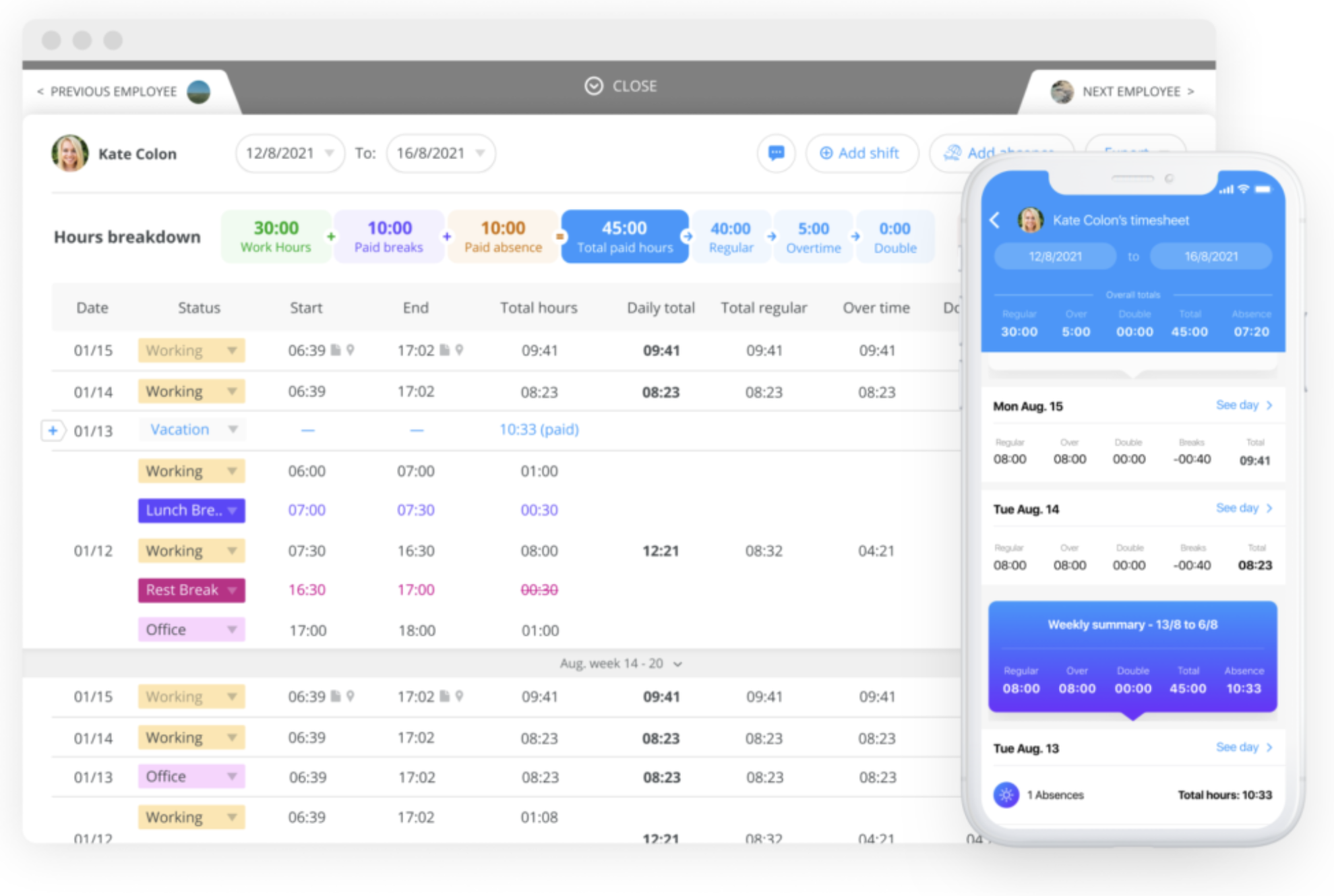
“Using Connecteam, I can manage all [my employees] and track [them all] on each project. The location system tells me where they are when they clock in and out each time. This is perfect for tracking all billable hours, correctly charging clients, and making sure my employees are where they’re supposed to be.”
— G2 review (Owner/Operator of a small business)
Main features
- Employee time-tracking features like a time clock, geofencing, GPS tracking, and buddy punching prevention
- Scheduling tools
- Task management capabilities
- Employee forms and checklists
- Self-service capabilities
- Communication features like surveys and a messenger
- HR tools like time off management, recognition and rewards, and employee document management
Best for
Connecteam is best for smaller businesses with distributed teams that need to track time and stay in touch on the go.
- Combines HR, operations, and communication tools in one platform
- Ideal for distributed teams and deskless employees
- Customizable workflow and forms
- Automatic shift scheduling
- Advanced time-tracking features like automatic break deductions and overtime alerts
- Users say the platform helps improve accuracy and accountability
- list item
- Some users find the wide array of features overwhelming
- Some features can’t be accessed directly from the mobile app
- Connecteam has fewer integrations compared to some competitors
- Not well-suited for more established businesses with complex HR needs
- list item
3. Harvest

“The convenient reporting features and simple interface are what I love about Harvest. The timer window allows me to easily monitor my expenses, track work progress on multiple projects at once, and view inspirational quotes each day.”
— G2 review (Data Science Manager at an enterprise-level organization)
Main features
- Time tracking and timesheets
- Custom reminders and personal reports
- Reporting and analysis capabilities
- Invoice and payment tools
- Expense tracking
- 50+ integrations, like Asana, ClickUp, and Slack
Best for
Harvest’s integrated invoicing and expense management makes it ideal for agencies and teams that manage multiple clients and work across various projects.
- Users appreciate its privacy-friendly, non-intrusive tracking
- Can turn time entries into customizable invoices
- Can produce detailed insights on things like billable hours, project budgets, and team productivity
- Good for project budgeting and cost control
- Simple, easy-to-navigate interface
- list item
- Reporting capabilities are limited compared to competitors
- Not all features are available offline
- No automatic time tracking
- Minimal project management features
- list item
4. Memtime
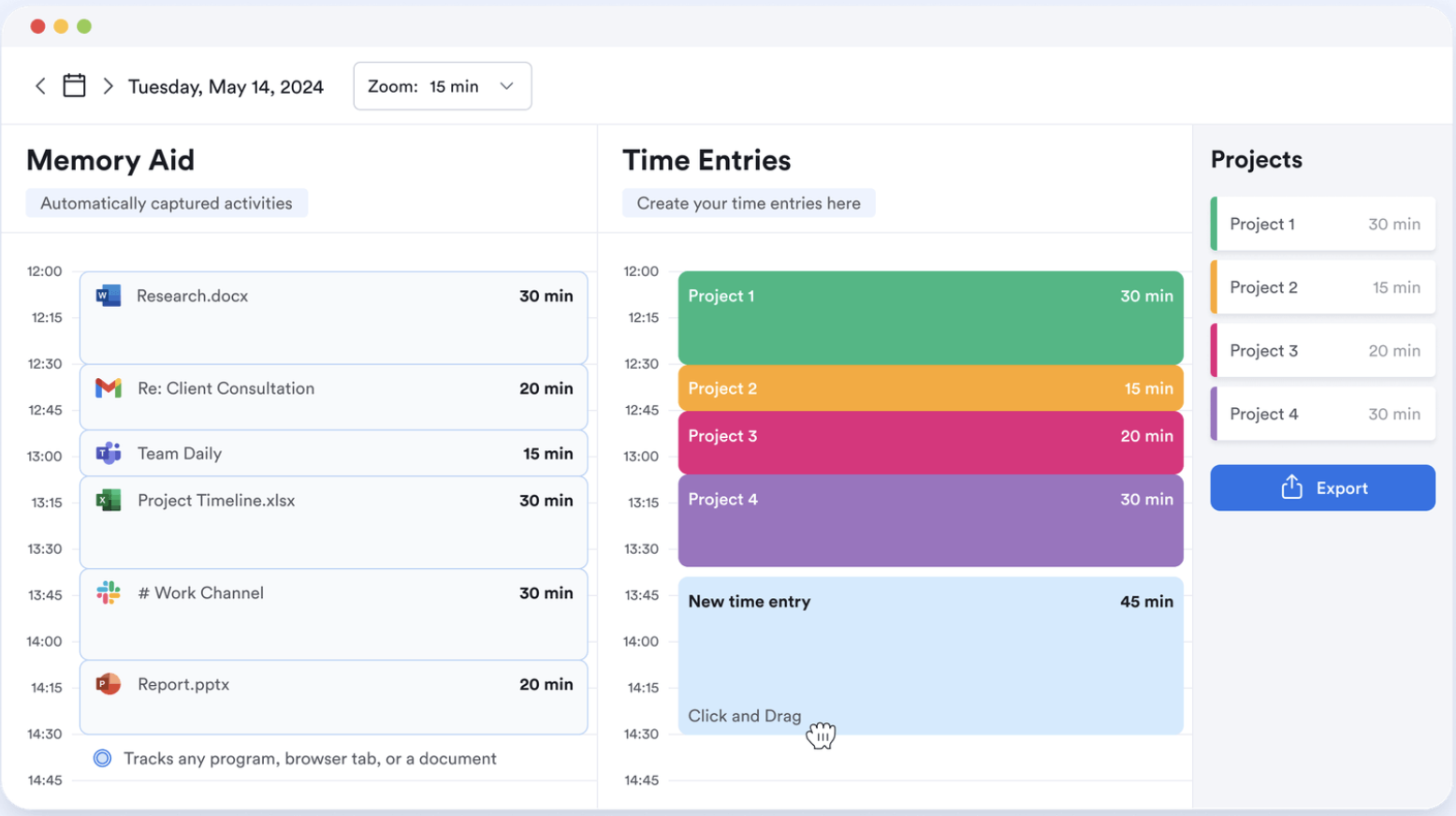
“Using Memtime makes tracking the time I spend with each client much easier since I don’t have to manually record the time taken with each document. It's automatic and works seamlessly in the background. It also tracks the time I spend volunteering, so it’s a useful time management tool for me. Setting it up took little time.”
— G2 review (Chief Engagement Officer at a small business)
Main features
- Automatic time tracking across different platforms, apps, websites, and documents without the need for manual timers
- Automatic timeline that gets populated in real time as team members work
- Offline tracking
- Custom, exportable reports
- Library of integrations
Best for
Memtime is best suited for professionals and teams interested in automatic, passive time tracking and who don’t need additional HR or people enablement capabilities.
- Data stays on the user’s device and is only visible to them
- Activity timeline makes it simple to recall tasks and accurately categorize time
- Most features work well offline and across platforms
- list item
- Some users say that synchronizing data across multiple devices can be challenging
- Some users find the platform expensive compared to competitors
- Designed for individuals with no built-in team tracking
- Users need to periodically check and review logged time, so it’s not a fully hands-off solution
- list item
5. Quickbooks Time
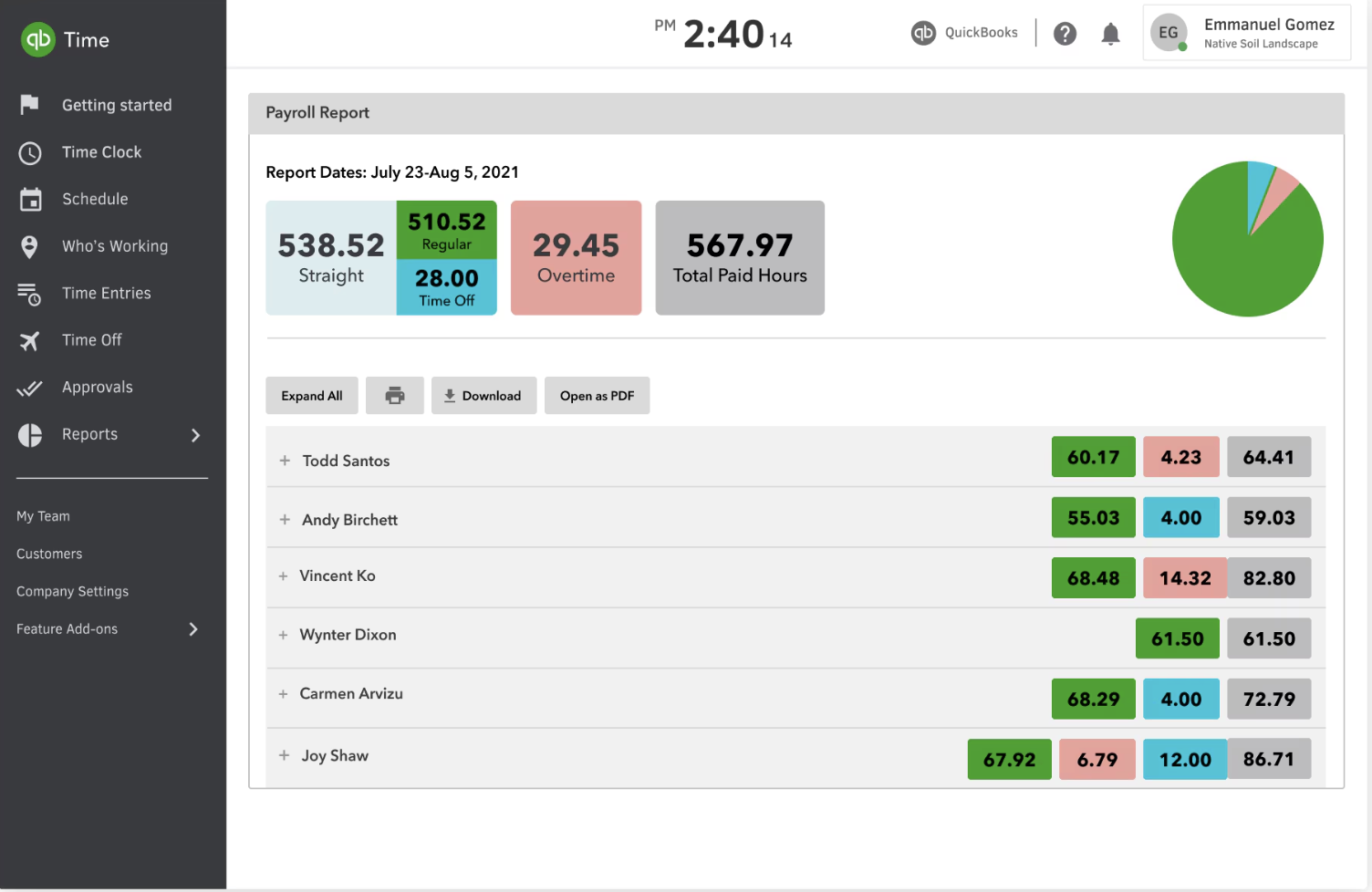
I use QuickBooks Time to keep up with the hours of all employees at my job as office manager. I run my Dad’s office for his plumbing company. I have to keep up with time, being that we’re a small, family-owned business. Makes writing checks on Friday so much easier.
— Capterra review (Office Manager at a small business)
Main features
- Employee time tracking and timesheets
- Overtime and PTO tracking
- Scheduling and shift management features
- GPS tracking and geofencing capabilities
- Offline tracking
- Payroll and billing integration
- Project tracking and job costing
- Reporting and compliance features
Best for
QuickBooks Time is ideal for businesses that already use QuickBooks’ suite of accounting and payroll tools. It’s also well-suited for distributed teams that need GPS tracking and businesses with hourly workers and shift schedules.
- Ideal for those who already use QuickBooks’ suite of tools
- Works well for hourly workers and distributed teams
- Shift-swapping capabilities are convenient for employees and managers
- Automatic timesheet approvals
- list item
- Some users say the platform is outdated
- Some users feel it’s expensive compared to competitors
- Some users report issues with customization
- list item
6. Time Doctor

“Time Doctor makes time tracking easy for both admins and employees. For employees, it’s a matter of selecting an appropriate task to start the timer. Meanwhile, admins get fed all necessary information in real time, and data can be toggled daily, weekly, monthly, or in a custom date range.”
— G2 review (small business)
Main features
- Manual and automatic time tracking
- Timesheets
- Offline tracking
- Productivity and activity monitoring
- Workforce analytics, including project tracking and work-life balance metrics
- Over 60 integrations
- Reporting capabilities
Best for
Time Doctor is well-suited for businesses that need advanced time tracking and are interested in employee monitoring and productivity analysis. It’s not ideal for organizations seeking additional HR or people enablement capabilities.
- Makes time tracking simple for admins and employees
- Users say it gives a clear picture of team productivity
- Good for managing everything from hourly freelancers to large teams
- list item
- Some users say monitoring features have raised privacy concerns for employees
- Some users report issues with customer support and billing
- Some users report occasional glitches with the time-tracking features
- list item
7. Toggl Track
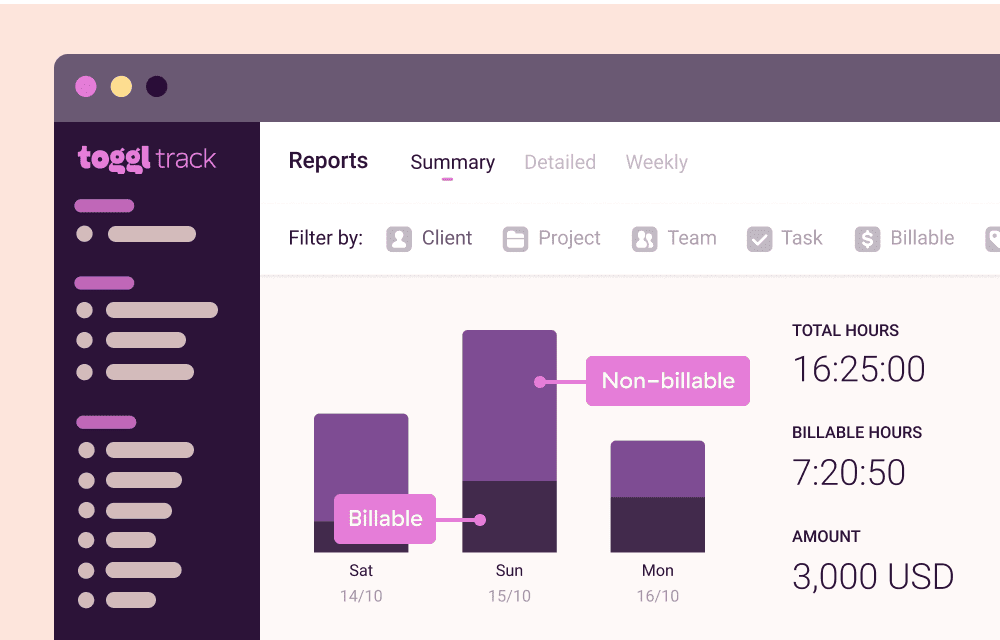
Toggl is very simple to use and extremely helpful when invoicing clients. Reporting is great, too. It’s nice to see what employees are working on, where we are on a project’s estimated time, and specific tasks within that project. Toggl also takes product improvement suggestions seriously.
— G2 review (President at a small business)
Main features
- Automatic and manual time tracking
- A large library of integrations
- Project management tools, like project estimates, project alerts, and historical billable rates
- Team management features, like team reminders, access permissions, and timesheet approvals
- Billing and payroll support
- Reporting and analytics
Best for
Small to medium-sized businesses looking for a simple time-tracking tool without additional HR capabilities. Works particularly well for agencies and consultancies.
- User-friendly, easy-to-navigate interface
- Simple to switch between tasks, projects, and clients
- Users enjoy the reporting features
- Simple to share time-tracking reports through public links
- list item
- Some users feel Toggl Track is expensive
- Some users report a learning curve at the outset
- Some users find it difficult to analyze the data
- Some users have experienced glitches with the platform
- list item




.webp)
Leapsome spart uns bei Performance Reviews enorm viel Zeit und hilft uns, eine offene, wertebasierte Feedbackkultur aufzubauen. Wir haben mehrere Plattformen verglichen, und Leapsome hat klar überzeugt: benutzerfreundlich, intuitiv und sehr anpassbar. Als Führungskraft schätze ich besonders, wie schnell und offen das Team von Leapsome auf unser Feedback und unsere Vorschläge reagiert.

Dr. Christian Grobe


Leapsome stärkt aussagekräftiges Feedback und Mitarbeiterengagement. Ein Must-have für jedes Unternehmen, in jeder Phase. Wir wachsen auf 750 Mitarbeitende zu, der Rollout war trotzdem einfach, schnell und erfolgreich. Der großartige Customer Support hat uns durch den gesamten Onboarding-Prozess begleitet.

Thore Schӓck
.webp)

Mit den People Analytics versteht ihr die Aussagekraft der Ergebnisse schnell. Wir nutzen außerdem häufig die 1:1-Funktion, die zwar sehr einfach, aber extrem nützlich ist.

Erica Ancobia


Wir sehen das People-Team als Partner, nicht als Verwaltungseinheit. Wir wollen uns auf unsere Mitarbeitenden konzentrieren, nicht auf Prozesse. Mit Leapsome haben wir die manuelle Arbeit rund um Feedback und Karriereentwicklung automatisiert. So können wir Zeit mit unseren Leuten verbringen: ihre Bedürfnisse verstehen, sie durch ihren ganz eigenen DCMN-Lifecycle begleiten und ihnen helfen, Sinn in ihrer Arbeit zu finden.

Theresa Jasaraj













Häufige Fragen

Häufige Fragen zu Preisen