How to migrate employee data to a new HR system: A guide

.jpg)
Employee data migration is the process of transferring employee data from one HR system — whether that’s a robust HRIS or a tangle of Excel spreadsheets — to a different one. And it’s a sensitive undertaking.
If information gets lost or corrupted, there’s a downstream effect on payroll, compliance, and trust. And just 42% of HR professionals say their HR tech gives them highly accurate analytics, and the same respondents cite data challenges as one of their biggest HR technology pain points.*
The most successful migration isn’t the one that holds onto the most data, but the one HR can trust after the migration is done.
This guide explains how to migrate employee data to a new HR system, covering the practical ins and outs and compliance considerations. By the end, you’ll know what should carry over to your new system and what you can safely scrap.
* HR.com, 2025
How do I migrate employee data to a new HR system? 3 steps
Here’s a high-level overview of how to migrate HR systems without disruption.
1. Audit and clean the data
“Have clean data before you migrate. You don’t want to start day one with a mess.”
— Siddharth Dhanuka, Head of Finance & Operations at SQUAKE
First, take inventory. Is all your employee data in your current software, or is it spread out across spreadsheets, payroll systems, and other tools?
Once you’ve tracked everything down, you’re ready to clean up. Cleaning data, also known as data cleansing, involves tracking down flawed information, like employee records, so it doesn’t make it into your new system. Fix errors by removing duplicates and filling in any missing or incomplete fields.
Next, standardize key fields like job titles and date formats. This helps the system quickly and accurately map data from each field in your current HR software to its equivalent in the new system.
2. Back up, test, and migrate
“When you copy data from one system to another, those can really become error-prone.”
— Erica Ancobia, CEO & Managing Director at KUN
Before doing anything else, create a backup of your existing records so you can start over if something goes wrong. Then run a basic functionality test by exporting a sample from your current dataset and importing it into the new system. Compare each imported record to the original side by side and confirm everything matches up.
When you’re confident everything is transferring correctly, it’s time for the main event. Schedule the cutover for a time and date when potential errors won’t affect mission-critical tasks like payroll processing. Once the big day arrives, freeze edits to your legacy system so updates don’t get lost during the transition. Now you’re ready to run the full migration using your chosen method.
Flexible HR software like Leapsome supports various ways of importing data, giving you one less thing to worry about.
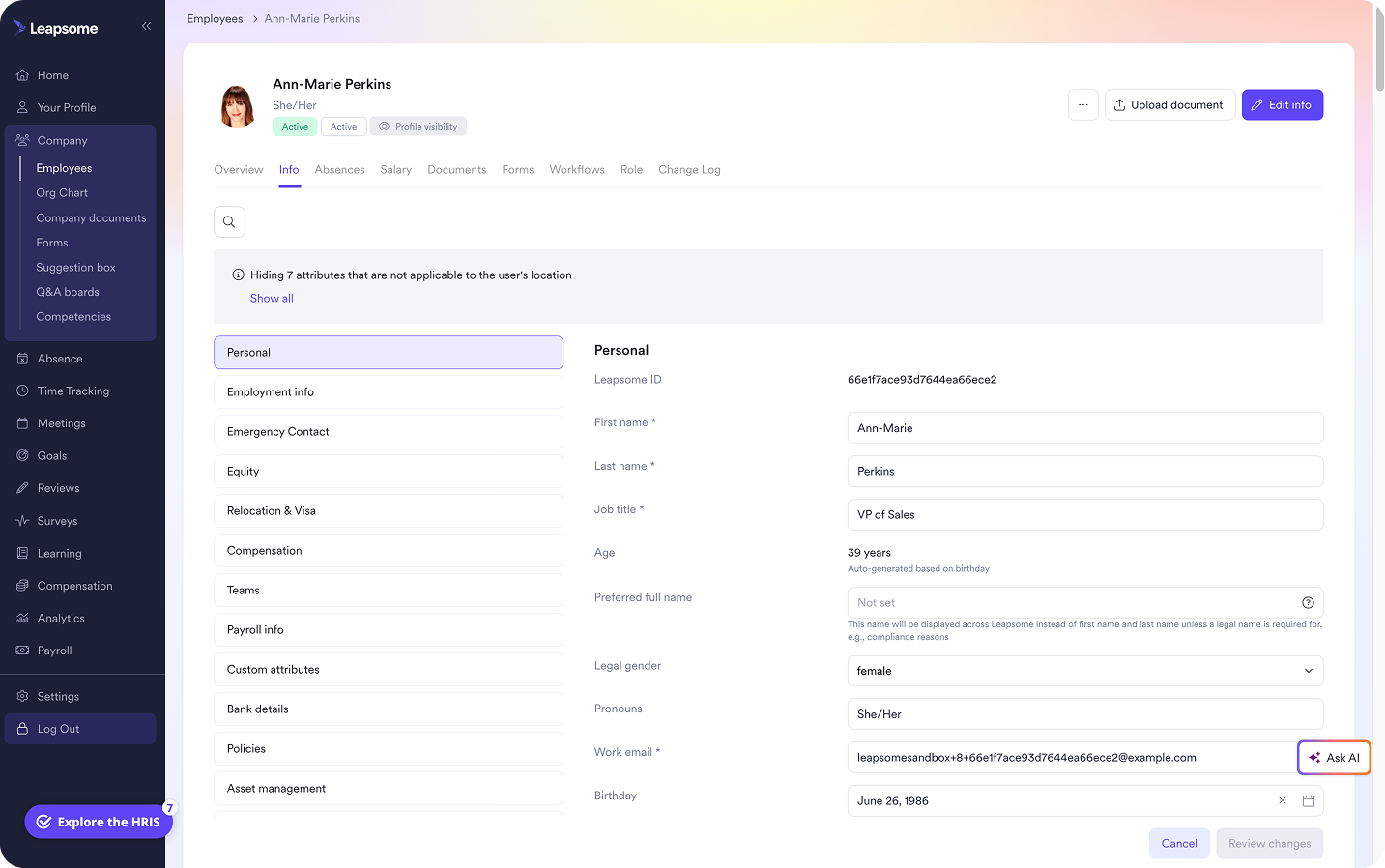
📈 Import your data your way
Bring your data onboard through Excel, SFTP, or HRIS sync, then configure employee profiles and access permissions around your planned data structure.
👉 Explore Employee Records
3. Confirm data quality
“Once it’s set up, everything runs automatically in the background. It might take hours to build, but then it just works smoothly and efficiently every time.” — Suraj Paneru, Customer Success Coach at Leapsome
Even if you’ve found the easiest HR software to set up and maintain, you still need to verify your data arrived intact before you can use it safely. Once you confirm data quality, a reliable HRIS keeps information synced and accurate time and time again.
For a quick check, confirm the new dataset has the same number of records and no required fields are empty. Then take a random sample of individual records and compare between systems, similar to the tests in the previous step.
Don’t forget to test integrations with connected tools like HR payroll software. Run a few sample workflows to verify the data is synchronizing seamlessly.
Finally, ask employees to test-drive the new system and verify their details are correct and complete. Make sure permissions work as intended and people see only what they’re supposed to.
“Bring Finance, managers, and leaders in early, show them what’s possible. When they help shape the views and get trained, they actually use the HRIS. That’s when the time savings show up.”
— Carolin Leidel, Consultant at torq. partners
How to protect employee data and stay compliant
Migrating data temporarily puts sensitive personal data in motion across potential exposure points like exports, temporary files, and multiple administrators. It’s up to employers to keep that sensitive data safe. And with just 20% of employees greatly trusting leaders to use data responsibly, according to a recent Gallup survey, how you handle your migration can significantly affect employee confidence, for better or worse.
Here are the core compliance and privacy issues to review during migration:
- Access and security: Clear up how the data will be encrypted, transferred, and stored. At the people level, make sure only essential stakeholders who have migration access.
- Data retention and minimization: Double-check data retention requirements and define a clear process for archiving or deleting legacy files, duplicates, and temporary migration copies. Migrate exactly what actually needs migrating and nothing else.
- Vendor oversight and auditability: Loop legal in to review points like your new software’s data processing terms and cross-border transfer requirements. Maintain a thorough record of the data you migrate, modify, and delete.
Take the hard work out of data protection and document management. An HR system like Leapsome comes with built-in digital audit trails.
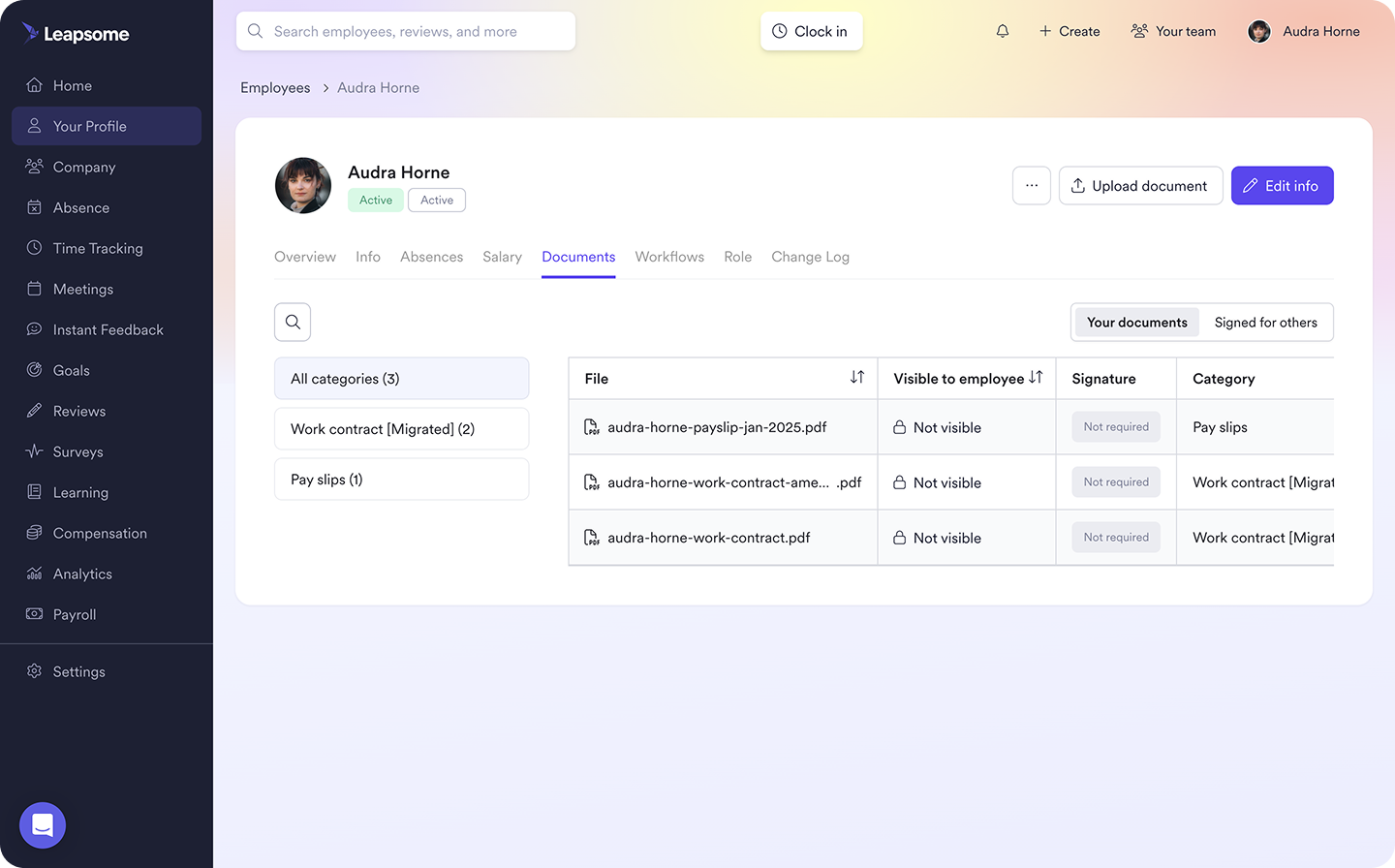
🔏 Keep every signature on the record
Connect documents to employee profiles to create a digital audit trail. Keep pristine records pre and post-migration with timestamps, version history, and signer details.
👉 Explore Documents & E-Signatures
What to keep for your HRIS migration and how to manage it
What data is required for an HR software migration depends on what information matters. Migration is an opportunity to leave years of stale fields, workarounds, and duplicate records in the dustbin. As SHRM points out, HR tech is only as dependable as the data that flows into it, and bad data can affect critical areas like payroll accuracy and workforce analytics.
“On the C-level, I learned to doubt people data because it arrived late and conflicted across files. Then, sitting in HR, I felt the pain from the inside and saw how much time went into rebuilding the same reports. Centralizing restores trust and your calendar.”
— Florian Klages, Managing Partner at torq. Partners
Pinpoint key company data
To help you decide what to hold onto, what to archive, and what to get rid of completely, run through the following list. For each data point, ask yourself if the data is accurate, necessary, or legally required:
- Core employee and employment data: Personal details, employee IDs, job titles, department names, reporting lines, employment statuses, contracts, compensation info, working arrangements.
- People process data: Performance reviews, goals, competencies, feedback, learning materials, onboarding information, absence records, time-tracking data.
- Compliance, documents, and system data: Policies, signed documents, payroll and tax documents, sensitive records, permissions configurations, custom data fields, integrations, workflows, audit-related data.
Sort legacy data into buckets
After reviewing each category, slot each data point into one of four buckets:
- Migrate and maintain: Up-to-date information HR still relies on for day-to-day work.
- Migrate as history: Historical data useful for contextualizing today’s data but not needed for today’s workflows.
- Archive: Information it’s advisable or legally required to retain but doesn’t need to take up space in the new system.
- Delete where legally appropriate: Duplicate or stale data you can safely remove without violating retention requirements.
For example, you might archive certain records about terminated employees for analytics or retention reasons, while getting rid of a timesheet file that’s years past its required retention period.
Always confirm information is safe to delete: Ignoring retention requirements carries real consequences. It’s bad data governance to delete information just because it seems old or unused.
Build a trustworthy HR data foundation with Leapsome
For lean HR teams, upgrading to a new HRIS can take weeks of cleaning spreadsheets, reconciling employee records, and hunting down contracts. And everyday HR work has to continue throughout that process.
With such a heavy lift, the last thing you want is yet another fragmented system that’s as difficult to maintain as your legacy software. Leapsome helps you lay a clean foundation without ongoing headaches. Get a strong start that lasts with:
- Centralized Employee Records: Bring employee profiles, role history, and compensation information into one interconnected system, complete with configurable data fields and granular access permissions. Import data using your preferred method via Excel, SFTP, or HRIS sync.
- Connected Documents & E-Signatures: Keep policies, NDAs, and signed documents permanently linked to the employee records they belong with.
- People processes that run on a single source of truth: Build on your foundation by conducting performance reviews, setting goals, and managing compensation — all pulling from and feeding into the same interlinked people data.
“Leapsome is very user-friendly — both for HR and for our employees. It gave us the flexibility to implement our specific feedback process, and it has reduced a lot of the manual work we would have had to do.” — Nina Thiessen, Head of Talent Acquisition and HR Management | EGYM
🧳 Let go of your data baggage
Trade in your legacy data jumble for an HR system that keeps employee records and people processes tightly linked from day one.
👉 Request a demo
FAQ
What are common methods for migrating employee data?
Some of the most common methods for migrating employee data include:
- Spreadsheet imports: Exporting data to Excel or CSV files, cleaning it up, and importing it into the new system.
- Secure file transfer protocol (SFTP): Piping data into the new system through an encrypted connection.
- HRIS sync: Connecting the old and new systems to transfer data programmatically.