PTO-Rechner: Bezahlten Urlaub genau berechnen


Haftungsausschluss: Dieser Rechner liefert eine unverbindliche Schätzung, ausschließlich zu Planungszwecken. Er basiert auf Standardsätzen und Schwellenwerten, die zuletzt im Juli 2026 überprüft wurden. Sätze und Schwellenwerte können sich mit der Zeit ändern und variieren je nach Standort, Branche und individuellen Umständen. Dies ist keine Steuer-, Rechts- oder Buchhaltungsberatung.
PTO-Rechner zeigen, wie viel Urlaub Mitarbeitende in einem bestimmten Zeitraum angesammelt haben. Sie wenden eure Ansammlungsrate an und berücksichtigen bereits genommene freie Tage.
Eine PTO-Berechnung auf Basis geleisteter Arbeitsstunden wirkt oft wie reine HR-Routine, bis mehrere Mitarbeitende dieselbe Woche frei nehmen wollen. Führungskräfte brauchen dann verlässliche Salden und einen klaren Überblick über anstehende Abwesenheiten, um zu entscheiden, ob das Team die Arbeit auffangen kann.
Viele Unternehmen schauen inzwischen über die reine Berechnung hinaus. Laut Mercer stuften 66 % der Arbeitgeber die Verbesserung der Urlaubsverwaltung 2024 als Top-Priorität ein, gegenüber 41 % im Jahr 2021.* Verlässliche Salden bilden die Grundlage. Vernetzte Abwesenheitsdaten helfen HR zu verstehen, wie genehmigter Urlaub Personaleinsatz und Lohnabrechnung beeinflusst.
Dieser Leitfaden bietet einen kostenlosen PTO-Rechner und zeigt, wie PTO-Daten euch helfen, vorauszuplanen und vorhersehbare Besetzungslücken zu vermeiden.
* Mercer, 2024
So berechnet ihr die PTO-Ansammlung
Um die PTO-Ansammlung zu berechnen, wandelt ihr den Urlaubsanspruch der Mitarbeitenden in eine Ansammlungsrate pro Abrechnungsperiode oder geleisteter Arbeitsstunde um. Wendet diese Rate auf den jeweiligen Zeitraum an und passt den Saldo anschließend um bereits genutztes PTO an.
🧮 Verfügbares PTO berechnen
Gebt die Angaben aus eurer PTO-Richtlinie ein, und unser kostenloser Rechner ermittelt das angesammelte und verfügbare PTO.
👉 Kostenlosen PTO-Rechner nutzen
So funktioniert die Formel des PTO-Ansammlungsrechners in der Praxis, damit ihr die Ergebnisse überprüfen und die Salden gegenüber Mitarbeitenden erklären könnt.
Ansammlungsrate bestimmen
Teilt den jährlichen PTO-Anspruch durch die Anzahl der Ansammlungsperioden im Jahr.
Jährlicher PTO-Anspruch ÷ Ansammlungsperioden = PTO pro Periode
Ein Beispiel: Eine Mitarbeiterin erhält 120 Stunden PTO über 26 zweiwöchentliche Abrechnungsperioden. Das bedeutet, sie sammelt etwa 4,62 Stunden pro Periode an.
Angesammeltes PTO berechnen
Multipliziert die Ansammlungsrate mit der Anzahl der abgeschlossenen Perioden.
Ansammlungsrate x abgeschlossene Perioden = angesammeltes PTO
Sammelt eine Mitarbeiterin 4,62 Stunden pro Periode an und schließt 10 Perioden ab, verdient sie 46,2 Stunden PTO.
PTO-Saldo aktualisieren
Addiert das neu angesammelte PTO zum Startsaldo der Mitarbeitenden. Zieht anschließend das bereits genutzte PTO ab.
Startsaldo + angesammeltes PTO - genutztes PTO = verfügbares PTO
PTO-Berechnungen unterstützen die Personalplanung, nicht nur Urlaubssalden
Unternehmen behandeln PTO oft als Mitarbeiterbenefit, den HR im Hintergrund berechnet und nachverfolgt. Diese enge Sichtweise trennt Employee Experience von der operativen Planung, obwohl beides zusammenkommt, sobald jemand Urlaub beantragt. Jeder genehmigte freie Tag verändert, wie viel Arbeit ein Team abdecken kann.
Der eigentliche Test kommt, wenn mehrere Mitarbeitende denselben Zeitraum frei nehmen wollen. Sehen Führungskräfte die Überschneidung nicht früh genug, um die Besetzung zu sichern, hat HR zwar den Anspruch erfasst, dem Unternehmen aber nicht bei der Planung geholfen.
Wie ihr PTO verwaltet, beeinflusst auch, wie Mitarbeitende das Unternehmen wahrnehmen. Eine Studie der Florida Atlantic University zeigt, dass mindestens 11 Tage PTO freiwillige Kündigungen deutlich senken können.
So können PTO-Daten die Personalplanung im gesamten Unternehmen stärken.
Personaleinsatzplanung verbessern
„Führungskräfte sehen, wer sonst noch frei hat, können Anfragen anpassen oder direkt genehmigen. Alles wird an einem Ort mit voller Transparenz visualisiert.“
Suraj Paneru, Customer Success Coach, Leapsome
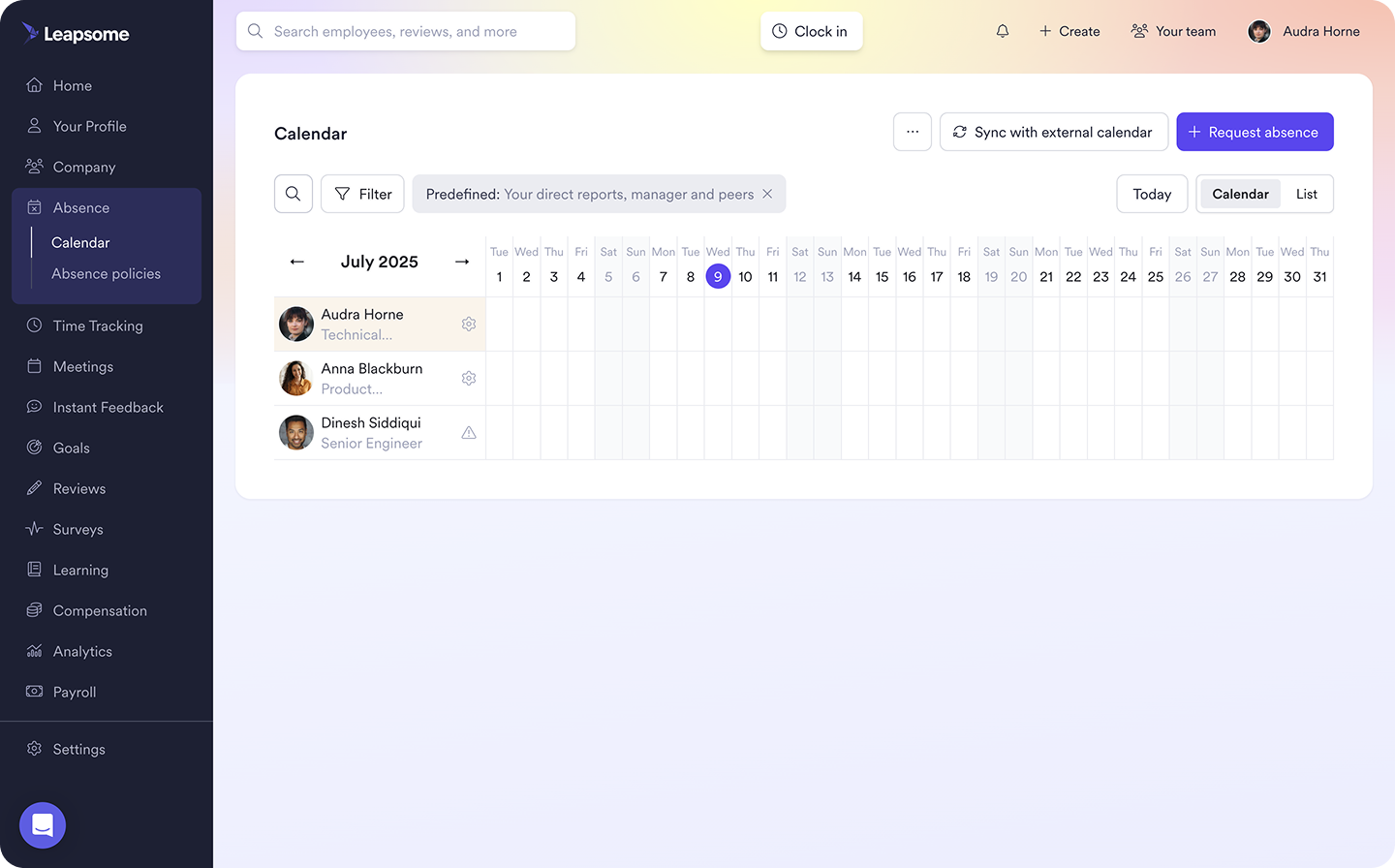
Ein verlässlicher Saldo bestätigt, ob eine Mitarbeiterin genug PTO für ihre Anfrage hat. Ein gemeinsamer Abwesenheitskalender zeigt, wie sich diese Anfrage mit anderem geplanten Urlaub überschneidet.
Zusammen helfen diese Informationen Führungskräften, Zeiträume mit möglichen Besetzungslücken zu erkennen. Sie können Arbeit vor der Abwesenheit umverteilen oder alternative Termine mit Mitarbeitenden besprechen. Das verhindert, dass Führungskräfte nach der Genehmigung zu vieler Anfragen in Hektik geraten.
PTO-Trends können auch wiederkehrende Engpässe aufzeigen. Häufen sich Anfragen zum Beispiel rund um die Schulferien, kann HR Teams helfen, die Besetzung im folgenden Jahr früher zu planen.
PTO-Berechnungen unterstützen Lohnabrechnung und Compliance
„Wir markieren sogar Compliance-Risiken: Verlangt ein Land zum Beispiel mindestens 20 bezahlte freie Tage, lässt die Plattform euch nicht darunter gehen.“
Suraj Paneru, Customer Success Coach, Leapsome
HR und Lohnabrechnung sollten mit demselben PTO-Datensatz arbeiten. Führt jedes Team eigene Salden, kann eine einzige Urlaubsanfrage zu widersprüchlichen Informationen und aufwendigen Korrekturen führen.
Ein zentrales PTO-System wendet die relevanten Ansammlungsregeln und Obergrenzen auf den Saldo jeder Mitarbeiterin an. Es zeigt außerdem, wann Mitarbeitende Urlaub nehmen oder ihn in eine neue Periode übertragen. Das gibt der Lohnabrechnung eine klarere Grundlage für die Bearbeitung bezahlter Abwesenheiten und etwaiger PTO-Auszahlungen.
Verlässliche Aufzeichnungen helfen euch, die PTO-Richtlinie des Unternehmens konsistent anzuwenden. Regeln lokale Gesetze Ansammlung oder Auszahlung, liefert eine dokumentierte Berechnung den Nachweis, wie das Unternehmen den Saldo einer Mitarbeiterin ermittelt hat.
Vertrauen durch Transparenz aufbauen
„Wenn eure HR-Systeme nicht wirklich miteinander sprechen... müsst ihr euch das eine aus dem HRIS holen, das andere aus dem Performance Review, wieder etwas anderes aus der Lohnabrechnung... Ich glaube, dann reißt der rote Faden ein Stück weit ab.“
Sammie Masley, People and Talent Partner bei Leapsome
Mitarbeitende merken es, wenn ihr PTO-Saldo nicht mit dem Urlaub übereinstimmt, den sie erwartet haben. Zeigt das HR-System eine Zahl und eine Führungskraft nutzt eine andere, kann aus einer Routineanfrage schnell ein Streitfall werden.
Gebt Mitarbeitenden Zugriff auf einen aktuellen Saldo und erklärt, wie ihr ihn berechnet habt. So können sie ihren Urlaub planen, ohne HR jede Anfrage bestätigen zu lassen. Transparente Salden fördern Vertrauen und Eigenverantwortung in eurer Belegschaft und zeigen Mitarbeitenden, dass ihr erarbeitetes PTO sichtbar und verfügbar ist.
Leapsome bringt PTO-Salden und Urlaubsanfragen in einen einzigen Workflow. Mitarbeitende können ihren Anspruch prüfen, bevor sie Urlaub beantragen, und Führungskräfte sehen, wer sonst noch weg ist, bevor sie die Anfrage genehmigen oder anpassen.
„Führungskräfte sehen bei einer Anfrage, wer weg ist, können Termine genehmigen oder anpassen, und der Kalender zeigt nur das Nötigste: zum Beispiel, dass jemand einfach nicht verfügbar ist.“
Suraj Paneru, Customer Success Coach, Leapsome
📅 Arbeit mit verlässlichen Urlaubsdaten planen
Leapsome Abwesenheiten automatisiert die PTO-Erfassung und bringt anstehenden Urlaub in eine Ansicht, damit Teams die Besetzung planen können, bevor Terminkonflikte entstehen.
👉 Abwesenheiten entdecken
So verwaltet ihr PTO effektiver
Eine genaue PTO-Berechnung garantiert noch keinen funktionierenden PTO-Prozess. Das Ergebnis ist nur nützlich, wenn ihr klare Richtlinien anwendet und die Urlaubsdaten aktuell haltet.
Mit diesen Schritten baut ihr einen PTO-Prozess auf, der funktioniert.
Eine klare PTO-Richtlinie erstellen
Legt zuerst fest, wie Mitarbeitende PTO verdienen und ab wann sie es nutzen dürfen. Hängt die Ansammlung von Abrechnungsperioden ab, gebt die Rate pro Periode an. Hängt sie von geleisteten Arbeitsstunden ab, erklärt, welche Stunden zählen.
Eure Richtlinie sollte klären, was am Jahresende mit nicht genutztem Urlaub passiert. Legt fest, ob Mitarbeitende ihn übertragen können und ob eine Ansammlungsobergrenze gilt. Müssen neue Mitarbeitende eine Wartezeit absolvieren, macht den Zeitrahmen beim Onboarding klar.
Gestaltet den Genehmigungsprozess leicht nachvollziehbar. Legt fest, wie weit im Voraus Mitarbeitende Anfragen stellen sollten, und erklärt, wie Führungskräfte mit sich überschneidenden Terminen umgehen sollen.
Urlaubserfassung automatisieren
Sobald ihr die Regeln in der Richtlinie festlegt, sollte euer HR-System sie automatisch anwenden. Statt HR jede Abrechnungsperiode denselben Anspruch neu berechnen zu lassen, automatisiert die PTO-Erfassung. So passt das System den PTO-Saldo an, sobald eine Mitarbeiterin eine anspruchsberechtigte Ansammlungsperiode abschließt oder eine Führungskraft Urlaub genehmigt.
Der Saldo aktualisiert sich automatisch, sodass Mitarbeitende ihr verfügbares PTO sicher über ein Self-Service-HR-Portal prüfen können, bevor sie Anfragen stellen. Mit dem richtigen Tool verbindet sich die Urlaubserfassung außerdem mit dem Mitarbeiterprofil in eurem HRIS und stellt sicher, dass HR und Lohnabrechnung mit denselben Abwesenheitsdaten arbeiten.
PTO-Daten für bessere Personalplanung nutzen
Schaut über einzelne Salden hinaus und vergleicht die Urlaubsnutzung teamübergreifend. Prüft Abwesenheitsmuster über das Jahr hinweg, um Zeiträume mit möglichem Besetzungsdruck zu erkennen sowie Teams, denen es schwerfällt, Zeit freizunehmen.
SHRM berichtete, dass 48 % der Beschäftigten nicht erwarteten, bis Jahresende ihren gesamten Urlaub zu nehmen. Hohe Arbeitsbelastung war für 24 % der Befragten ein Hindernis, 14 % nannten Druck durch Führungskräfte. Trägt eine Abteilung dauerhaft hohe PTO-Salden, sollte HR deren Kapazität und Führungspraxis prüfen, statt eine niedrige Abwesenheitsquote zu feiern.
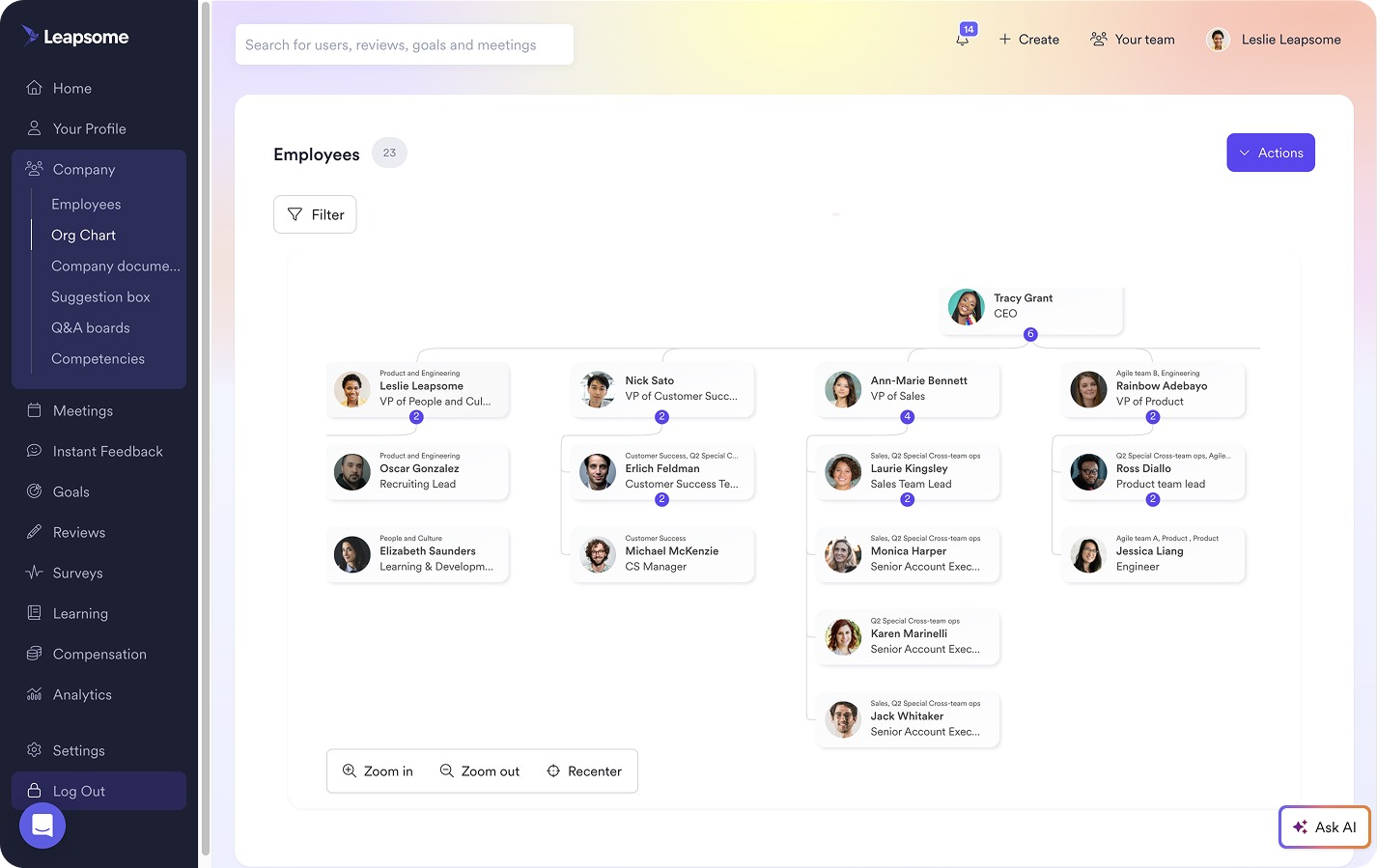
Deshalb setzen HR-Teams auf ein vernetztes HRIS, um Urlaubsmuster in den richtigen Kontext zu setzen. Mit Leapsome könnt ihr Abwesenheitsdaten zusammen mit Engagement- und Performance-Insights prüfen, bevor ihr auf einen Trend reagiert.
„Wir verbinden verschiedene Teile von Leapsome, um Dashboards zu erstellen, die Abwesenheitsdaten mit Performance- und Engagement-Daten zusammenführen.“
Ankit Saigal, Head of Product, Leapsome
📊 Abwesenheitsmuster in Planungsentscheidungen verwandeln
Leapsomes HRIS verbindet Urlaubstrends mit Engagement- und Performance-Daten und gibt HR mehr Kontext für Kapazitätsplanung und Reporting an die Führungsebene.
👉 HRIS entdecken
Mitarbeiterurlaub effizienter verwalten mit Leapsome
Ein PTO-Rechner wandelt angesammelte Stunden in Tage um und bestätigt einen verfügbaren Saldo. Er kann Anfragen aber nicht mit der Unternehmensrichtlinie abgleichen oder Führungskräften zeigen, wie sich Urlaub auf die Besetzung auswirkt. Verwaltet HR diese Entscheidungen über getrennte Datensätze, werden Abweichungen wahrscheinlicher, je mehr das Unternehmen wächst.
HR-Teams müssen sich nicht mit fragmentierten Prozessen abmühen. Leapsomes AI-gestütztes All-in-one-HRIS macht aus PTO-Berechnungen einen vernetzten Urlaubsprozess. Mit Leapsome Abwesenheiten können Teams:
- Salden aktuell halten: Automatisiert Ansammlungen nach eurer Richtlinie und passt Salden an, wenn Führungskräfte Urlaub genehmigen.
- Mitarbeitenden direkten Zugriff geben: Lasst Mitarbeitende ihr verfügbares PTO prüfen und Anfragen per Self-Service stellen.
- Führungskräften helfen, die Besetzung zu sichern: Zeigt Führungskräften, wer sonst noch weg sein wird, bevor sie sich überschneidende Anfragen genehmigen.
- Personalplanung stärken: Vergleicht die Urlaubsnutzung teamübergreifend und bezieht sie ins Reporting an die Führungsebene ein.
„Mitarbeitende finden jetzt alles an einem Ort: ihre Daten, Abwesenheiten, Ziele und Reviews. Ich muss nicht mehr erklären, welches Tool wofür da ist. Es ist alles in Leapsome.“ Merilyn L, Senior People Operations Specialist | Bob W
🧱 Einen Urlaubsprozess aufbauen, auf den sich euer Unternehmen verlassen kann
Leapsome hält PTO-Daten aktuell und gibt Führungskräften die Transparenz, die sie brauchen, um Abwesenheiten einzuplanen.
👉 Demo anfordern
FAQ
Wie berechne ich Urlaubszeit?
Um angesammelte Urlaubsstunden zu berechnen, multipliziert die Ansammlungsrate mit der Anzahl der anspruchsberechtigten Abrechnungsperioden oder geleisteten Arbeitsstunden. Addiert übertragenen Urlaub und zieht anschließend bereits genutzte Urlaubszeit ab.


_under_300kb.jpg)