HR-Integration: So verbindet ihr eure Systeme erfolgreich


In der Anfangsphase nutzt euer HR-Team vielleicht ein System für die Gehaltsabrechnung, ein weiteres für das Recruiting und noch ein anderes für Performance Reviews. Doch dieses Flickwerk wird wahrscheinlich zum echten Problem, sobald euer Unternehmen richtig wächst. Laut Daten von Gartner sind 69 % der befragten Mitarbeitenden im vergangenen Jahr auf mindestens eine Hürde mit ihrer HR-Technologie gestoßen.* Dieselbe Umfrage ergab außerdem, dass nur 35 % dieser Befragten der Meinung sind, dass ihre HR-Technologie ihre Geschäftsziele unterstützt. Ein wesentlicher Treiber dieser weit verbreiteten Frustration ist die Fragmentierung der Daten.
Ein Weg, dieses Problem anzugehen, besteht darin, eure Systeme mithilfe von HR-Integrationslösungen miteinander zu verbinden. In diesem Leitfaden zeigen wir euch, warum HR-Systemintegration für eure HR-Strategie ein echter Gamechanger sein kann.
* Gartner, 2024
Was ist HR-Integration?
Eine HR-Integration verbindet eure HR-Software mit anderen Systemen, auf die euer Team angewiesen ist, etwa Finanzen, Produktmanagement und Lernplattformen. Auch wenn das zunächst rein technisch klingt: Solche Integrationen können HR von einer abgekoppelten Verwaltungseinheit zu einem strategischen Partner machen. Statt im Silo zu arbeiten, fließen Daten frei zwischen den Teams, und HR-Verantwortliche können diese Erkenntnisse über die Belegschaft in unternehmensweite Initiativen einbringen.
Neben der Unterstützung von HR eröffnen diese Integrationen auch Business Intelligence über zentrale Abteilungen hinweg. Drei der häufigsten Systemverbindungen in HR-Software-Integrationen sind:
- Finanzsysteme: Wenn euer Finanzteam Einblick in HR-Kennzahlen wie Time-to-Fill und Fluktuationsraten hat, kann es bei der Budgetplanung und der Prognose eurer Belegschaft fundiertere Entscheidungen treffen.
- Learning-Management-Systeme: Wenn ihr jeder mitarbeitenden Person Zugang zu den relevantesten, wirksamsten Lernressourcen und beruflichen Entwicklungsmöglichkeiten gebt, könnt ihr sie schneller an ihre Performance-Ziele heranführen.
- Ops- und Produktsysteme: Die Verknüpfung von HR-Daten mit Projekt- und Operations-Tools kann aktuelle Geschäftsanforderungen besser mit den Fähigkeiten und der Verfügbarkeit der Mitarbeitenden abgleichen, für eine effizientere Ressourcenverteilung.
Das bloße Teilen von Daten verringert den administrativen Aufwand eures Teams nicht automatisch. Es erfordert eine bewusste Abstimmung mit anderen Teams, einschließlich der Frage, wie sie alles von Aufgabenübergaben bis hin zu Mitarbeiteraktualisierungen und Freigaben handhaben. Mit den Workflows von Leapsome könnt ihr all die manuellen, teamübergreifenden Prozesse automatisieren, die die Arbeit typischerweise ausbremsen. Unsere All-in-one-HRIS- und People-Management-Plattform bewegt Personaldaten nahtlos, ohne HR Kopfzerbrechen zu bereiten.
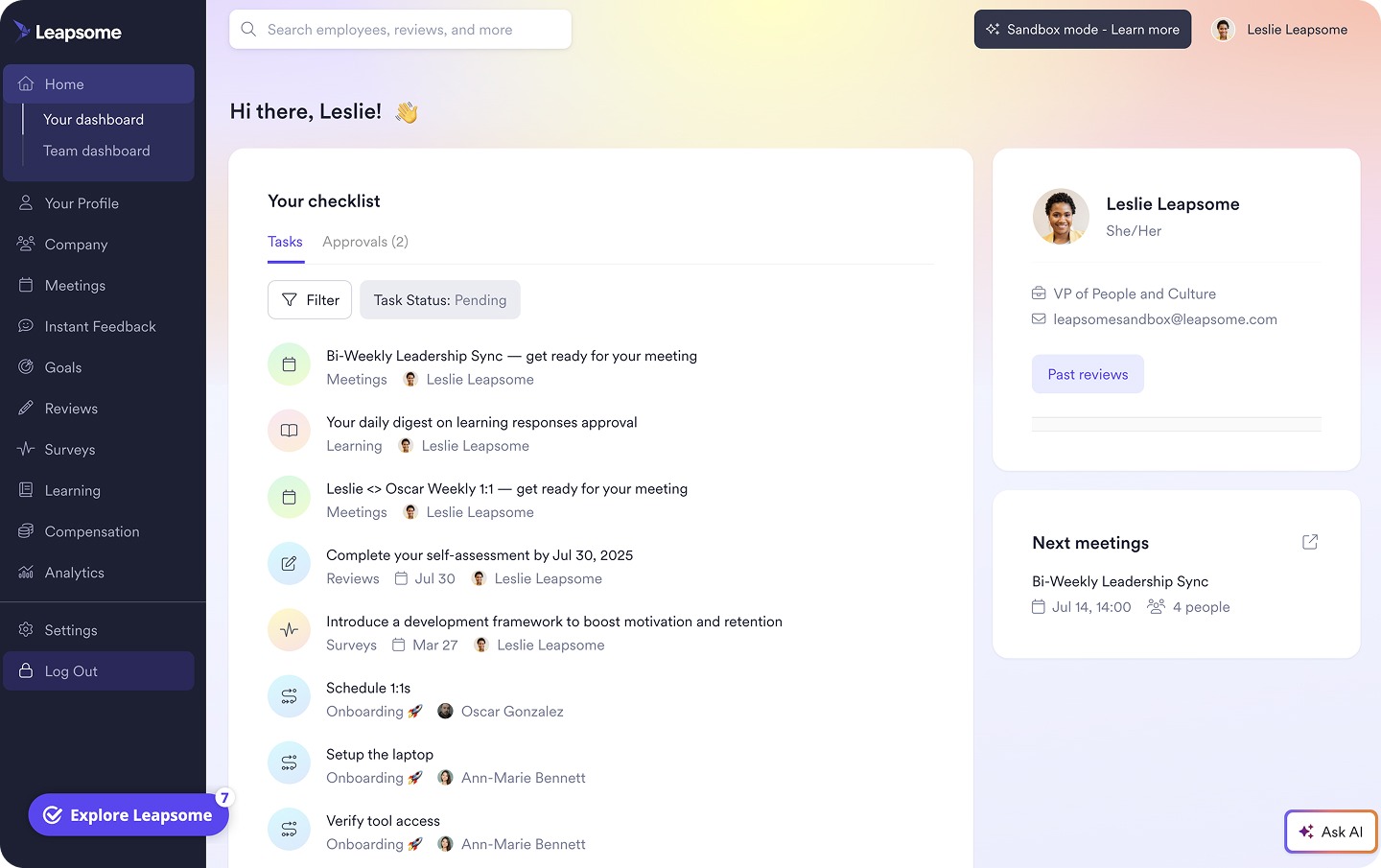
⚙️ Reduziert euren administrativen Aufwand mit Automatisierungen
Die Workflows von Leapsome verbinden People-Prozesse organisationsweit automatisch, damit HR-Teams ihre Zeit darauf verwenden können, Mitarbeitende zu unterstützen, statt Systeme zu synchronisieren.
👉 Workflows entdecken
Drei Arten von HR-Integrationen
Es gibt drei verschiedene Wege, eure HR-Systeme zu verbinden. Welche Integrationsoptionen euch konkret zur Verfügung stehen, hängt jedoch von euren übrigen Programmen ab.
1. Integrierte Verbindungen
Die führenden HR-Plattformen lassen sich oft bereits mit gängigen Business-Tools verbinden, was sie einfach in der Einrichtung und Pflege macht. Leapsome bietet zum Beispiel über 90 integrierte Integrationen mit gängigen ATS-, Payroll- und Projektmanagement-Tools. Kleine und mittlere Unternehmen tendieren zu Programmen mit vorgefertigten Integrationen, weil sie schnelle Lösungen für Teams bieten, die sich nicht auf IT-Support verlassen oder ganze Tech-Stacks neu aufbauen möchten.
2. Individuelle Verbindungen
Individuelle API-Verbindungen schaffen Anbindungen an spezifische Workflows und unterstützen anspruchsvollere Reporting- und Automatisierungsbedürfnisse. Auch wenn das mehr technische Schritte bis zur Inbetriebnahme bedeutet, bieten individuelle APIs mehr Flexibilität bei der Gestaltung eurer Integration. Diese Anpassbarkeit macht sie wertvoll für Unternehmen mit einem etablierten Tech-Stack, der bereits gut funktioniert, aber keine vorgefertigten Integrationen besitzt, sowie für wachsende KMU mit zunehmend komplexen HR-Prozessen.
3. Manuelle Datenübertragungen
Wenn ihr Daten lieber auf die altmodische Art integriert: Dateibasierte Integrationen sind eine manuelle Methode, bei der Mitarbeiterdaten über Tabellen oder CSV-Dateien exportiert und importiert werden. Durch die fehlende Automatisierung sind diese Integrationen am wenigsten effizient und am anfälligsten für Pannen durch menschliche Fehler. Start-ups und kleine Unternehmen, die nur gelegentlich einfache Datenaktualisierungen benötigen, übertragen ihre Daten aber unter Umständen manuell, um Softwarekosten zu sparen.
Vorteile und Best Practices für HRIS-Integrationen
„HR sollte Geschäftsentscheidungen nicht nur unterstützen: Ihr gestaltet sie mit. Ihr müsst wie ein Profitcenter denken, nicht wie ein Verwaltungssilo.“
– Anita Anthonj, Founder und CEO von Talaera
Das Ziel besserer Datenintegration ist es, HR zu einer stärkeren strategischen Kraft in eurem Unternehmen zu machen. Indem ihr eure HR-Software mit den meistgenutzten Plattformen anderer Teams verbindet, gewinnt ihr die Datenklarheit, die ihr für schnelle und sichere Entscheidungen braucht. Das bringt auf operativer Ebene einige wesentliche Vorteile:
- Bessere strategische Personalplanung: Durch die Vereinheitlichung von Daten über den gesamten Employee Lifecycle wissen Verantwortliche aller Teams, wer neu dazukommt, wer sich weiterentwickelt und wo Wissenslücken bestehen.
- Fundiertere, datengestützte Entscheidungen: Eine bessere HR-Integration macht Aktualisierungen organisationsweit sichtbar. So beruhen die Entscheidungen jedes Teams auf belegbaren Trends statt auf Meinungen, gespeist aus einem steten Strom genauer Informationen.
- Klare Sicht auf Personalkosten und ROI: Besonders die Verbindung von HR- und Finanzplattformen hilft beiden Teams, den Zusammenhang zwischen Personalausgaben und dem Nutzen für das Unternehmen sichtbar zu machen.
Leapsome bleibt nicht beim Verbinden von Systemen wie Payroll und ATS stehen: Es hilft HR-Teams, all ihre operativen Daten in Echtzeit zu verknüpfen. Von der Analyse von Performance-Review-Ergebnissen bis zum Aufbau von Gehaltsbändern bedeuten die Integrationen von Leapsome mit über 90 Tools, dass HR-Teams weniger Zeit für manuelle Arbeit (und Korrekturen) und mehr Zeit für die Verbesserung der Employee Experience aufwenden können.
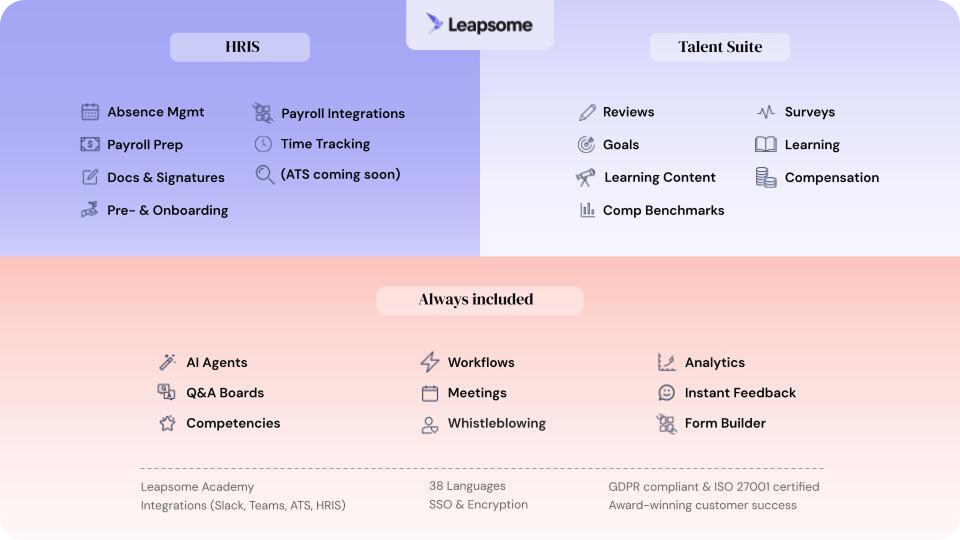
🔗 Schafft ein vernetztes System für HR-Analytics
Die Integrationen von Leapsome bringen eure HR-Tools, Payroll und das ATS in ein Dashboard, für konsistente Aktualisierungen und umsetzbare Datenflüsse.
👉 Integrations entdecken
HR-Integrationen können die Sichtbarkeit über Teams hinweg erhöhen und Workflows für alle verbessern. Ihre volle Wirkung entfalten sie jedoch nur, wenn eure Organisation bereit ist, sie zu nutzen. Achtet darauf, einige Best Practices umzusetzen, um den größtmöglichen Nutzen aus diesen Tools zu ziehen:
- Prüft euren aktuellen Tool-Stack: Tretet zunächst einen Schritt zurück und schaut euch die Systeme, die ihr bereits nutzt, genau an. Zu verstehen, wo eure Informationen derzeit liegen, und Ineffizienzen wie überlappende Tools oder doppelte Daten aufzudecken, macht es leichter, gezielt zu erkennen, wo ihr Integrationen braucht und wo andere Schritte, etwa das Zusammenführen von Programmen, mehr helfen würden.
- Priorisiert durchgängige Integrationen: Am besten habt ihr die gesamte Employee Journey in eurem Dashboard, statt wertvolle Informationen über eine Reihe isolierter Programme zu verteilen. Das verschafft euch nicht nur einen 360°-Blick auf eure Mitarbeitenden, sondern spart auch viel Zeit, die euer Team sonst mit dem erneuten Eingeben von Daten über Plattformen hinweg verbringen würde.
- Beginnt mit Datenflüssen mit großer Wirkung: Die Prozesse, die HR-Teams täglich bearbeiten, sind am wahrscheinlichsten mit übermäßiger manueller Arbeit und Datenfehlern behaftet. Wenn ihr diese Workflows mit hohem Volumen zuerst automatisiert, solltet ihr einen deutlichen Rückgang von Ungenauigkeiten und Ineffizienzen bemerken.
Woran ihr erkennt, dass ihr bereit für eine HR-Integration seid
„Viele HR-Teams kämpfen noch mit den Grundlagen: zu viele unverbundene Tools, begrenzte Einblicke. Genau deshalb haben wir ein wirklich people-first HRIS gebaut, das alle Mitarbeiterdaten in einer Single Source of Truth vereint.“
– Suraj Paneru, Customer Success Coach bei Leapsome
Beim Recherchieren von HR-Datenintegrationsdiensten ist das Timing wichtiger, als einfach nur die richtige Technik zu haben. Es gibt jede Menge HR-Integrationstools, aber das heißt nicht, dass euer Unternehmen bereit ist, die Erkenntnisse zu nutzen, die sie liefern.
Bevor ihr euch auf eine größere HR-Integrationsinitiative festlegt, nutzt diese Fragen als Leitfaden, um euch ein objektives Bild davon zu machen, ob eure Organisation operativ bereit ist.
Datenreife
„Sorgt für saubere Daten, bevor ihr migriert. Ihr wollt nicht am ersten Tag mit einem Chaos starten.“
– Siddharth Dhanuka, Head of Finance and Operations bei SQUAKE
Integrationen und Automatisierungen zu einem unzuverlässigen Datensystem hinzuzufügen, verstärkt bestehende Probleme eher, als sie zu lösen. Ihr braucht keine perfekten Systeme, aber sie sollten in den Grundlagen (wie Mitarbeiterakten und standardisierten Jobtiteln) konsistent genug sein, um ein verlässliches Fundament zu bilden.
Fragen, die ihr euch stellen solltet:
- Wie oft prüfen und bereinigen wir unsere Mitarbeiterdaten?
- Verwenden wir teamübergreifend dieselben Namenskonventionen und Berichtsstrukturen?
Tool-Konsolidierung
Ein kleinerer, bewusst zusammengestellter HR-Stack macht Integrationen leichter handhabbar und konsistenter. Schaut euch all eure aktuellen Tools an: Welche sind für alle unverzichtbar, und welche liefern eher teamspezifische Einblicke? Indem ihr eure Integrationsbemühungen auf Tools konzentriert, die eine bessere teamübergreifende Zusammenarbeit fördern, vermeidet ihr unnötige Komplexität oder das Duplizieren bereits bestehender Prozesse.
Fragen, die ihr euch stellen solltet:
- Welche Systeme sind heute unsere primäre Quelle für Mitarbeiterdaten?
- Lösen mehrere Tools dasselbe Problem in verschiedenen Abteilungen?
Abstimmung der Stakeholder
„Ihr könnt Workflows auf jede Gruppe ausrichten: HR, Finance, IT oder eine Führungskraft. Alle werden automatisch benachrichtigt, sodass Routinearbeit einfach im Hintergrund passiert.“
– Suraj Paneru, Customer Success Coach bei Leapsome
Auch wenn „HR“ im Namen steckt, ist HR-Integration in Wahrheit ein funktionsübergreifendes Projekt mit viel Abstimmung zwischen Finanz-, Führungs- und IT-Teams. Und wenn ihr euren Tech-Stack erneuert, möchten die Stakeholder ebenfalls Teil des Gesprächs sein. Klare und frühzeitige Kommunikation ist notwendig, um alle in Bezug auf das „Was“ und „Warum“ dieser neuen Systeme auf demselben Stand zu halten.
Fragen, die ihr euch stellen solltet:
- Gibt es einen klaren Verantwortungsplan für die Umsetzung und Pflege dieser Integrationen?
- Sind sich HR-, Finanz-, IT- und Führungsteams über die Ziele dieser Integrationsinitiative und die dafür nötigen Schritte einig?
Compliance-Bereitschaft
Ohne Data-Governance-Richtlinien gibt es keine Datensichtbarkeit. Wenn ihr Mitarbeiterinformationen über immer mehr Systeme teilt und speichert, stellt sicher, dass alle die Gesetze rund um Datenschutz und Datenzugriff kennen, damit ihr nicht riskiert, versehentlich mit sensiblen Informationen falsch umzugehen.
Fragen, die ihr euch stellen solltet:
- Haben wir klare Richtlinien dafür, wer systemübergreifend auf Mitarbeiterdaten zugreifen und sie verwalten darf?
- Sind unsere aktuellen Tools und Prozesse mit allen Datenschutz- und Compliance-Anforderungen vereinbar?
- Haben Mitarbeitende kürzlich eine Datensicherheitsschulung absolviert, oder müssen wir eine Auffrischung verschicken?
Macht aus fragmentierten HR-Daten mit Leapsome Entscheidungskraft
Wenn ihr eure HR-Daten mit anderen Programmen integriert und nichts passiert, schiebt das Scheitern nicht automatisch auf die Tools. In vielen Fällen tun sich Unternehmen mit der Integration ihrer Systeme schwer, weil ihre Prozesse ineffizient sind. Bei schlechten Datenrichtlinien wird euer HR-Team weiterhin den Großteil seiner Zeit damit verbringen, Berichte manuell abzugleichen, statt sich in wertvolle Mitarbeiteranalysen zu vertiefen.
Leapsome hilft HR-Verantwortlichen, dieses Problem zu vermeiden, indem es all eure Mitarbeiterdaten in unserer vereinheitlichten HRIS- und People-Management-Plattform zusammenführt. Statt Integration als reine Backend-Übung zu behandeln, schafft ihr eine umfassende Datenbasis, die zur universellen Single Source of Truth wird, die HR braucht, um zum strategischen Superhelden zu werden.
„Mitarbeitende finden jetzt alles an einem Ort: ihre Daten, Abwesenheiten, Ziele und Reviews. Ich muss nicht mehr erklären, welches Tool wofür da ist. Es ist alles in Leapsome.“ – Merilyn L., Senior People Operations Specialist bei Bob W
📊 Macht aus HR-Integration mehr als ein technisches Setup
Das HRIS von Leapsome geht über das bloße Synchronisieren von Systemen hinaus und liefert People-Analytics, die HR wirklich für die strategische Planung nutzen kann.
👉 Demo buchen
FAQ
Was umfasst die Integration im Personalwesen?
HR-Integration verbindet eure HR-Programme (wie HRIS, ATS und Payroll) mit Software, die in anderen Abteilungen genutzt wird (wie Customer-Relationship-Management und Learning-Management-Systeme), sodass Daten nahtlos zwischen ihnen und durch eure gesamte Organisation fließen. Üblicherweise verbindet ihr die Software dabei entweder über das Programm selbst oder über eine von eurem Engineering-Team eingerichtete API.
Wie integriere ich ein HRIS mit Payroll, Benefits und anderen Systemen?
Das hängt von eurem Setup ab. Die Einrichtung eurer HRIS-Plattform bestimmt, ob ihr eine Drittanbieter-Software nativ integrieren könnt (was in der Regel mit wenigen Klicks machbar ist) oder ob ihr das Engineering-Team hinzuziehen müsst, um eine API zu bauen. Die meisten HRIS-Plattformen akzeptieren auch dateibasierte Datenübertragungen, doch diese Integrationen erfordern in der Regel viel Zeit und manuellen Aufwand.

.png)


Entdeckt unsere Plattform für HRIS, Performance und Entwicklung.