Headcount planning in 2026: How to hire, upskill, and budget without the guesswork
.png)

If your revenue targets keep rising while budgets stay tight, you need a headcount plan that links team needs to what you can genuinely deliver.
Our research shows 53% of HR leaders have decided not to backfill certain roles due to AI, while 77% say AI has created new roles in their organization. At the same time, 66% of respondents report rising workloads, and 50% feel more overwhelmed year over year.*
With conditions moving so unpredictably, without a carefully structured plan, you’re guessing at who you need and when.
This guide walks you through a practical seven-step process that links long-term workforce planning to quarterly execution. You'll know who to hire, when to upskill instead, and what pitfalls to avoid.
We also share which tools to prioritize, so you can keep hiring, upskilling, and performance aligned in one system.
🧭 Stop planning in spreadsheets. Start planning strategically.
Leapsome HRIS connects role demands, internal talent, and budget in one platform so your headcount plan stays aligned to reality.
👉 Explore Leapsome HRIS
*Leapsome 2026 Workforce Trends Report
What is headcount planning (and why it matters in 2026)
Headcount planning is the process of mapping your hiring, backfills, reassignments, and training to your budget and business goals. It answers who you need, when, and how you’ll fund it.
In 2026, strategic headcount planning is more important than ever, with revenue targets remaining ambitious despite an increasing emphasis on cash efficiency. Global employment growth is slowing, placing pressure on practically every hiring decision.
At the same time, only about one-third of CEOs plan to integrate AI into workforce and skills strategy in the next three years. This creates a gap between ambitious plans and the people needed to execute them.
A clear workforce planning process keeps you aligned to what matters: delivering results without overextending your team or your runway.
The headcount planning process: a simple, repeatable framework
Headcount planning is a key function of people management. The key to success is working through it step by step, with all key stakeholders involved throughout the decision-making process.
Your goal must always be to ensure teams have the capacity and skills to hit their goals without exceeding budgets or burning people out.
The process below walks you through seven practical steps. Each one builds on the last, so by the end, you'll have a plan you can confidently put into place. And because you've involved the right stakeholders from the start, you'll have buy-in when it's time to move forward.
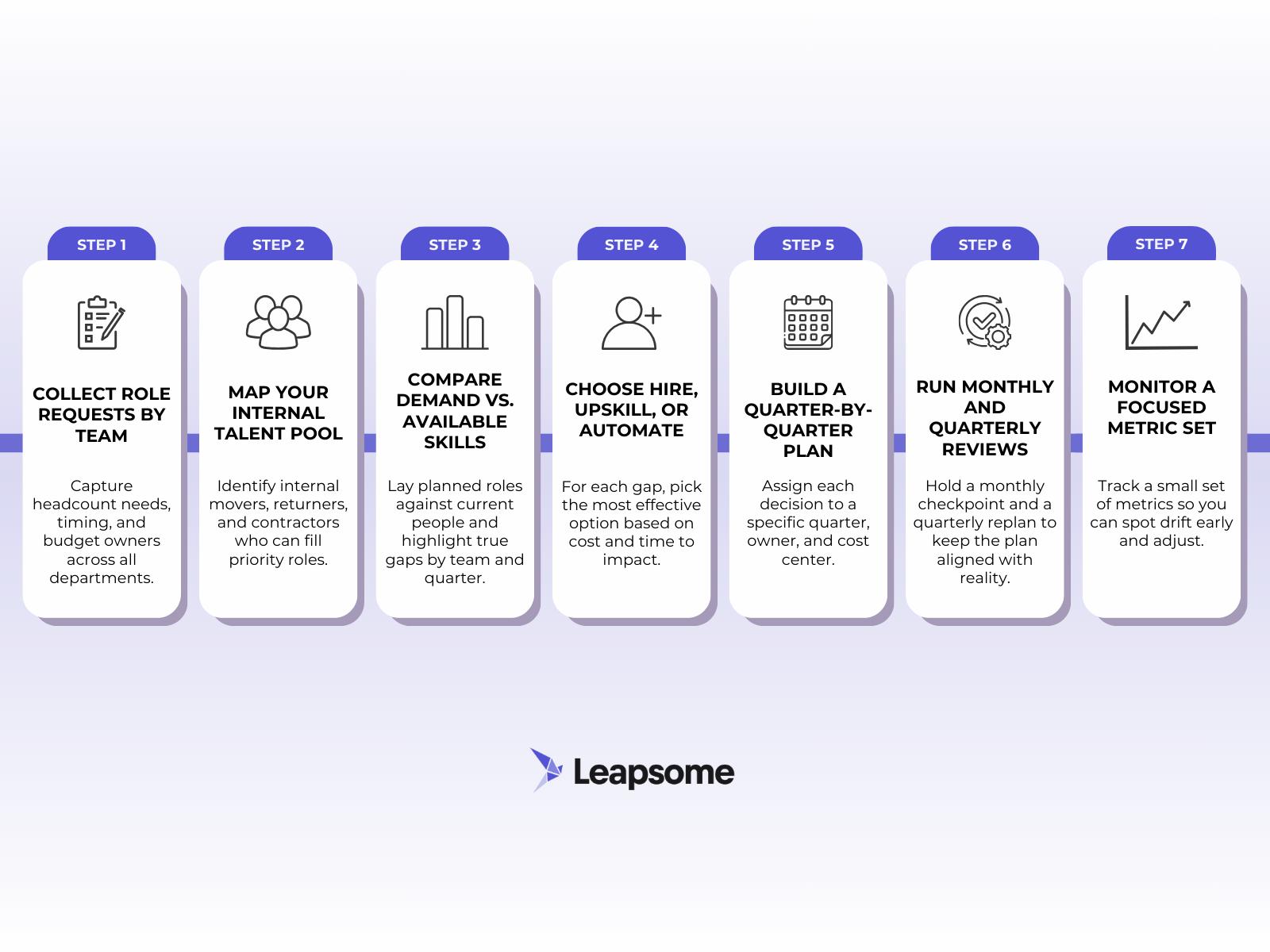
Step 1: Gather needs by team
This is where you sit down with each department head and figure out what they actually need. As well as asking "how many people do you want?", you’ll need answers to the following questions:
- Which roles are critical to hitting their goals?
- Which ones are backfills for people who left or got promoted?
- What's the ideal timing of the hire?
- Is it remote, hybrid, or on-site?
- Who’s the hiring manager and budget owner?
Once you have this from every team, consolidate it into a single role demand list organized by team, quarter, and budget line.
Keep it in a shared doc so everyone works from the same source of truth. This is also a good opportunity to integrate it with your HR data governance process to ensure the data remains clean and accessible.
Step 2: Check current supply
Before you start posting jobs, take a hard look at who you already have. You might be able to fill some of those gaps without hiring at all. Internal moves are often faster and cheaper than external hires.
Look for:
- High performers who want to shift teams or take on new challenges
- Employees returning from leave who can step into roles you thought were empty
- Contractors you can convert to full-time if they've already proved themselves
The tricky part here is making sure people are actually ready for the change. Conduct structured check-ins with their current managers to validate readiness. With Leapsome, you can easily access past performance reviews and feedback to confirm whether someone has the skills and track record to succeed in a new role.
Once you've mapped out who's available and when, you'll have an internal supply list. This shows who can fill what role and the timing for each move. It won't cover everything, but it'll reduce your external hiring load and also give your people growth opportunities.
Step 3: Reconcile demand vs. supply
Now you're ready to match your role clusters to the people you already have. Lay your demand list next to your supply list and mark the gaps. This is where you see which teams are overstaffed, which are short, and where skills don't align with what you need.
At this stage, you may need to make some tough calls: just because someone wants a role doesn't mean they're ready for it, and just because a team has headcount doesn't mean they have the right mix of skills to execute their roadmap. Therefore, you need to look out for mismatches in volume, timing, and capability.
This step is the heart of workforce demand and supply planning. It's also where politics can creep in as individuals lobby for specific roles or advocate for their team’s priorities, so keep the conversation focused on business outcomes and skill requirements, rather than seniority or who deserves what.
At the end of this step, you should have a gap table that shows unfilled roles by team and quarter. This tells you exactly where to focus your hiring, upskilling, or automation efforts. It's also the foundation for the trade-off decisions you'll make in the next step.
Step 4: Decide how to close the gaps
For each gap, you have three options: hire someone new, upskill someone internally, or automate the work.
The right choice depends on how quickly you need change and what the work actually requires. Start making your decision by comparing each option on two dimensions. First, consider the cost — the total spend to close the gap, including recruiting, training, or tooling. Second, evaluate the time-to-impact or ramp-up time — how many quarters until the person or process is fully productive.
Here's a simple rule of thumb to guide your decisions (of course, adapt it to the specifics of your case):
- If time-to-impact is one quarter or less and the skill doesn't exist internally, hire
- If it's two to three quarters and the skill is adjacent to what your team already has, upskill
- If the work is repeatable with low variance and you can QA the output, automate and plan to redeploy the person to higher-value work
You can also use predictive HR analytics to model costs and ramp times for each scenario before committing. This keeps the conversation grounded in data. By the end of this step, you'll have a decision for each gap timing and a named owner. This clarity makes the next step much easier.
👀 Extra insight:
According to the 2025 LinkedIn Workplace Learning Report, executives rank skills gaps and internal mobility as top priorities. Companies that treat career development as a lever to retain skills see better outcomes than those that default to external hiring for every gap.
To address this key concern, you can use personalized learning paths in Leapsome to track progression against competencies. That way, you'll know when someone is ready to take on the full scope of the role, not just part of it.
Explore Learning
Step 5: Turn decisions into a quarterly plan
Now take all those decisions and map them to a calendar. Each role or training investment is assigned to a specific quarter, accompanied by an owner and a budget line.
Your plan should specify the role title and team so it's clear who's hiring, the start quarter (Q1, Q2, Q3, or Q4) based on priority and capacity, the hiring manager or upskilling owner for accountability, and the budget allocation tied to a specific cost center.
This is the document you'll bring to finance and department heads for approval. It's also the baseline you'll track against in your monthly check-ins. Ensure everyone sees the same version, and lock it down once you receive sign-off.
A good quarterly plan isn't just a list of roles. It also shows the trade-offs you made and timing that aligns with product launches, revenue targets, and capacity constraints.
With a strong, carefully developed plan, if someone asks why a role is in Q3 instead of Q2, you should be able to point to the demand-supply reconciliation and the cost-timing trade-offs that drove the decision.
Step 6: Set the cadence so the plan doesn't drift
Even the best plan falls apart without regular check-ins. To maintain an accurate and useful headcount plan, you need two recurring processes in place: a monthly checkpoint and a quarterly replan.
Your monthly checkpoint plays and should involve representatives from HR, finance, and relevant functional areas. Keep the agenda tight so you can complete it within 45 minutes:
- Hiring velocity vs. plan — are we on track or falling behind?
- Budget health — are we under or over on spend?
- Risks or blockers — what's slowing us down?
- Decisions that need escalation — what can't wait until next month?
As you go, log every decision with an owner and due date. This helps prevent shadow hiring (where managers try to sneak roles in outside the plan) and keeps everyone accountable.
Your quarterly replan is where you adjust for reality. Revenue targets change, attrition spikes, product roadmaps shift. Use this session to reset your baseline without starting from scratch. The monthly checkpoints provide early warning signals, so the quarterly replan is your opportunity to implement practical solutions.
Your people enablement platform should play a key role here. For example, with Leapsome’s HRIS, you can see performance, employee goals, and feedback data in one place, so HR, finance, and managers share the same view of gaps, hiring progress, and ramp-up.
Step 7: Track a short metric set
In most cases, you need just four metrics to see how well your headcount plan is working. Here’s what to track:
- Time-to-fill: How long it takes to go from opening a req to getting an offer accepted
- Ramp-to-productivity: How many quarters it takes for a new hire to hit full output
- Cost per productive head: Total comp plus onboarding and training, divided by productive tenure
- Plan variance: Actual hires vs. planned hires by quarter
Review these metrics in your monthly checkpoint. If variance climbs above 15%, dig into root causes. Are roles taking longer to fill because the market is tight? Are new hires ramping slower because onboarding is weak? Are you overspending because you're paying above-market rates?
These metrics give you early warning signs so you can course-correct before small problems become big ones. Keep them visible in a one-page dashboard that everyone on the planning team can access.
🎯 Keep HR, finance, and managers aligned in real time
Give everyone the same insights into your people data, including skills gaps, team capacity, and hiring.
👉 Learn more about Analytics
Five common headcount planning mistakes to avoid
Even with a solid process, it's easy for plans to slip. These are the mistakes that can quietly undo good headcount planning, and what you can do instead.
1. Treating headcount as a reward
When teams are stretched thin or have been advocating for more support, it's natural to want to address their needs. But if your headcount decisions are driven by perceived fairness or volume of requests rather than strategic priorities, you risk misaligning capacity with actual business needs.
Instead, ask every leader to link each new role to a clear outcome, for example, hitting a revenue target or shipping a specific release. If they can’t explain that link in one or two sentences, the role may not belong in this cycle.
2. Hiring by habit instead of fixing the real problem
Many gaps are actually process or focus problems, not personnel issues. You add another role, but the bottleneck is unclear ownership, poor tooling, or low-quality work.
According to our 2025 HR Insights Report, 73% of HR leaders say their organization is planning workforce restructuring to integrate AI, and 85% of those planning restructuring expect it to happen within the next 12 months. Yet hiring decisions often remain rooted in yesterday's needs rather than tomorrow's reality.
When a team asks to hire, start with simple questions. What would this person do in their first 90 days? What will they stop the team from doing or fix that's broken today? If the answers are vague, aim to solve the underlying issue first.
3. Ignoring ramp time and real cost
It's easy to plan as if new hires are productive from the first month. In reality, most people need at least a quarter to learn the product, team, and workflows, sometimes more.
When you plan, include both salary and ramp time. Ask when this role needs to be fully productive and work backwards. If a role must be at full output in Q2, you can't wait until the end of Q2 to hire. Set clear role goals and milestones so new hires know what full productivity looks like from day one.
4. Allowing shadow hiring
Shadow hiring happens when managers create roles outside the agreed plan or swap titles and levels to move around approval rules. On paper, your plan looks fine, but in reality, headcount and costs creep up without a clear decision.
Make it clear who can approve new roles, backfills, and level changes, and log those decisions in one shared place. If a manager wants to change the plan, they should bring it to the next checkpoint instead of trying to work around it.
5. Having no single source of truth
If HR, finance, and team leads are all working from different sheets, you'll argue about whose numbers are right instead of fixing problems. Small differences in role counts and dates add up over the year.
Pick one shared view of the plan that everyone uses. In the Leapsome platform, HR, finance, and managers see the same performance, goals, and headcount data in real time. If people trust the data, they're much more likely to stick to the plan.
📊 Turn headcount planning into strategic workforce management
Leapsome's HRIS gives HR, finance, and managers a single source of truth for roles, budgets, and real-time data.
👉 Explore Leapsome HRIS
Build the team you need with structured headcount planning
With our headcount planning framework, you have a process that connects what you need to what you can afford and when you can actually deliver it. The seven steps take you from scattered requests to a quarterly plan that finance will approve, and teams will follow.
When conditions shift mid-year (and they invariably will), you can quickly adjust your plan using your three scenarios. As you do so, avoid common pitfalls:
- Don't treat headcount like a reward
- Don't hire out of habit when the real problem is process
- Pay attention to ramp time
- Don't let shadow hiring creep in
- Provide all the key stakeholders with real-time data from a single source of truth
Your next step is to schedule a session with HR, finance, and your department heads to start gathering role needs. Then set up your monthly 45-minute check-in so the plan actually stays alive.
🗓️ Plan headcount with confidence, not guesswork
Link hiring, upskilling, and performance in one system. Get the visibility you need to hit targets without exceeding budget.
👉 Book a demo
FAQs about headcount planning
What is headcount planning, and how does it differ from strategic workforce planning?
Headcount planning focuses on short-term hiring, backfills, and timing so teams have enough capacity to hit their goals. Strategic workforce planning looks 12 to 24 months ahead and connects people's decisions to long-term business priorities. Both matter, but headcount planning is the operational layer you update most often.
How do you connect workforce demand forecasting to workforce supply planning in 2026?
Start by collecting role needs from each team, then map them against internal talent, timing, and skills. The gaps you find become your hiring, upskilling, or automation decisions. Use one shared plan so HR, finance, and managers see the same demand and supply picture in real-time.
How do scenario guardrails improve workforce planning versus annual plans?
Scenario guardrails help you adjust hiring pace without rebuilding your entire plan. You set simple thresholds for metrics like pipeline coverage or NRR. If the numbers shift, you move into Base, Accelerate, or Constrain mode. This keeps your plan responsive instead of locking you into assumptions from last year.
What tools support operational workforce planning on a quarterly cadence?
You need tools that keep role data, performance signals, and decisions in one place. For example, Leapsome's HRIS and analytics dashboards show skills, AI readiness, and hiring progress so HR and finance can adjust plans each quarter. A shared system reduces drift and makes replanning faster for everyone.
Sam Abrahams

.jpg)




.jpg)