Leapsome’s product updates: AI widget builder, workflow triggers & absence updates

This month we’re introducing an AI-powered widget builder for analytics, new workflow triggers tied to reviews and forms, and several improvements across payroll prep, absence management, and integrations. These updates expand how teams analyze people data, automate HR processes, and keep everyday operations running smoothly across the platform.
🤖 Leapsome AI
Widget builder and interpretation
The AI Copilot can now generate analytics widgets directly from natural-language questions. Instead of manually selecting metrics, filters, and visualization types, you can simply ask a question about your people data and the system creates a ready-made widget. Once the widget is generated, it can be added directly to dashboards and used alongside existing analytics widgets. Each widget also includes a written interpretation that summarizes the key patterns or metrics shown in the visualization.This update reduces the amount of manual configuration required to build dashboards and helps teams move from a question about their data to a usable analytics view more quickly.
.png)
Document upload as input for AI conversations
Documents can now be uploaded directly into conversations with the AI Copilot. These files act as additional context for the AI during the conversation, allowing it to reference information from the uploaded material when generating responses. This makes it possible to include supporting documents such as review summaries, reports, or PDFs directly in an AI discussion without copying and pasting their contents. Once uploaded, the AI can reference the document during the conversation to provide more relevant responses. The feature helps centralize information within the AI conversation itself and reduces the need to switch between multiple tools or documents.
💰 HRIS – Payroll Prep
Payroll integration: ADP Workforce Now
Leapsome now includes a one-way integration with ADP Workforce Now, allowing employee master data to remain aligned between systems. When configured, employee information stored in Leapsome HRIS can be exported directly to ADP Workforce Now for payroll processing. This integration helps keep payroll-related data consistent between platforms and reduces the need for manual data transfers. By maintaining alignment between employee records, teams can prepare payroll exports directly from Leapsome while continuing to manage employee information within the HRIS. The result is a more streamlined handoff between HR data management and payroll processing.
.png)
Salary history on the user profile
A new Salary section has been added to the user profile, providing a centralized place to track salary changes over time. This section shows the history of salary updates, making it easier to review compensation adjustments directly within an employee’s profile. The salary history view allows administrators and managers with the appropriate permissions to see past changes and understand how compensation has evolved. All entries are displayed within the same profile view, removing the need to track salary adjustments across separate records.This creates a single, structured location for reviewing salary history within the platform.
🔁 HRIS – Workflows
Workflow timeline view
Workflows now include a timeline canvas that displays the sequence and timing of steps in a visual layout. This read-only view organizes workflow actions into time buckets, making it easier to understand how each step relates to the overall process. Instead of navigating through a list of individual workflow steps, the timeline view presents the structure of the workflow as a complete process. This makes it easier to review how tasks are ordered and how they unfold over time. The timeline canvas does not change how workflows are configured, but it provides a clearer overview of complex workflows once they have been created.
.png)
New event trigger: Review submitted
Workflows can now be triggered when a review is submitted. Once a review submission occurs, any workflows connected to that trigger can start automatically. This allows notifications, follow-up tasks, or other workflow steps to begin immediately after a review has been submitted. By linking workflows to review submissions, teams can ensure that the next steps in a process are initiated automatically without additional coordination.
.png)
New event trigger: Form submissions
Form submissions can now act as workflow triggers. When a form is submitted, a workflow can start automatically based on that event.This allows responses from forms to initiate tasks, notifications, or additional workflow steps immediately after submission. The trigger connects form responses to the broader workflow system, helping automate follow-up actions that depend on submitted information.
.png)
🏝️ HRIS – Absence management
Send flexible absence digest in Slack
Leapsome can now send a daily absence digest directly to Slack. The digest highlights employees who are out due to PTO or sick leave, providing a quick overview of absences for the day.The message appears automatically in the configured Slack channel and groups absence information into a single update. This makes it easier for teams to see who is unavailable without checking the platform manually. By surfacing absence information within Slack, the digest helps keep teams informed while they work within their existing communication tools.
.png)
Unlimited absence carryover
Absence policies can now be configured with unlimited carryover, allowing unused leave days to roll over without an automatic expiration limit. This configuration option allows organizations to align absence policies more closely with their internal rules or regional requirements. Once enabled, unused days continue to carry over according to the policy settings instead of expiring at the end of a cycle. The change removes the need for manual adjustments when policies allow unused time off to remain available.
.png)
Add public holidays to Google and Outlook calendars
Public holidays can now automatically sync to Google Calendar and Outlook as “Out of Office” events. Once enabled, holidays defined in Leapsome appear directly in connected calendars. The calendar entries ensure that schedules reflect public holidays automatically, helping prevent meetings or bookings from being scheduled on those days. This integration keeps calendars aligned with company holiday schedules and reduces the need to manually add or manage those entries.
⭐ Reviews
Improved review approval flow for locked & rejected assessments
The review approval flow has been improved to better handle locked and rejected assessments. Finalized assessments now move through the full approval flow even when edits are locked. If a review is rejected during the approval process, it clearly returns to a state where it can be updated and resubmitted. This makes it easier to identify what needs to be addressed and continue the approval process without confusion.These updates clarify the status of reviews throughout the approval cycle and make it easier to complete the process from submission through final approval.
Cross-module analytics: Manager review score
Manager review scores can now be displayed directly within analytics dashboards. This brings manager evaluation data into the broader analytics environment, where it can be analyzed alongside other people metrics. By including review scores in dashboards, teams can view manager performance indicators without needing to open separate reports. The data becomes part of the same analytics system used for other HR insights, allowing it to be monitored and compared over time.
.png)
📊 Surveys
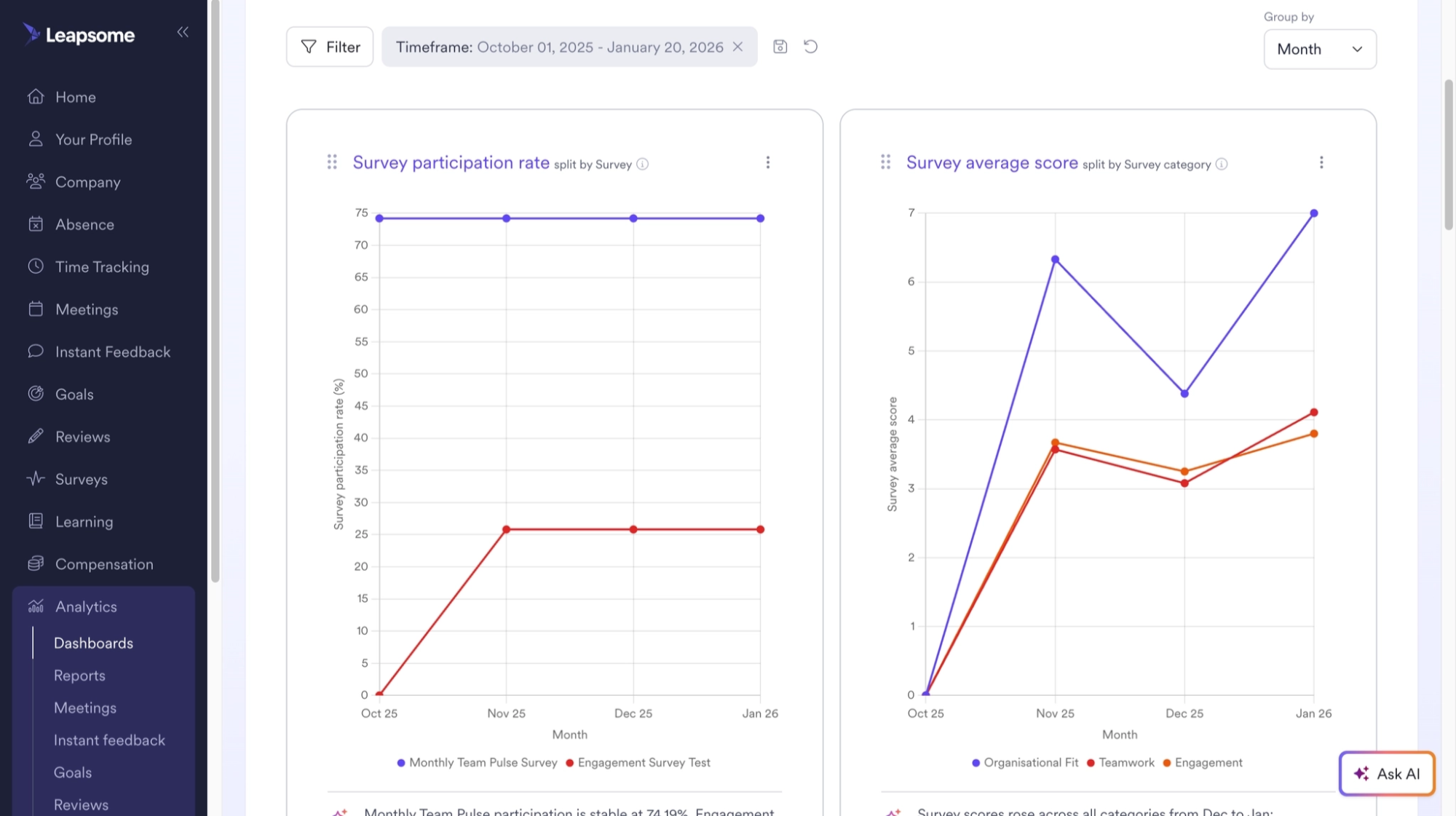
Cross-module analytics: Survey results
Survey results can now be analyzed across modules through unified dashboards. This allows survey insights to be compared alongside other data points, such as performance or retention metrics. By bringing survey data into the same analytics environment, teams can review engagement insights together with related organizational data. The dashboard view helps surface patterns across different sources without requiring separate reporting tools.
🗣️ Meetings
Add images to talking points and comments
Images can now be added directly to talking points and comments in meetings. These images appear inline within the discussion content.The update allows participants to include visual references alongside written notes, making it easier to present examples, screenshots, or supporting visuals during meeting discussions. By supporting images within talking points and comments, meetings can include more context without relying on external documents or links.
🔗 Platform / Integrations
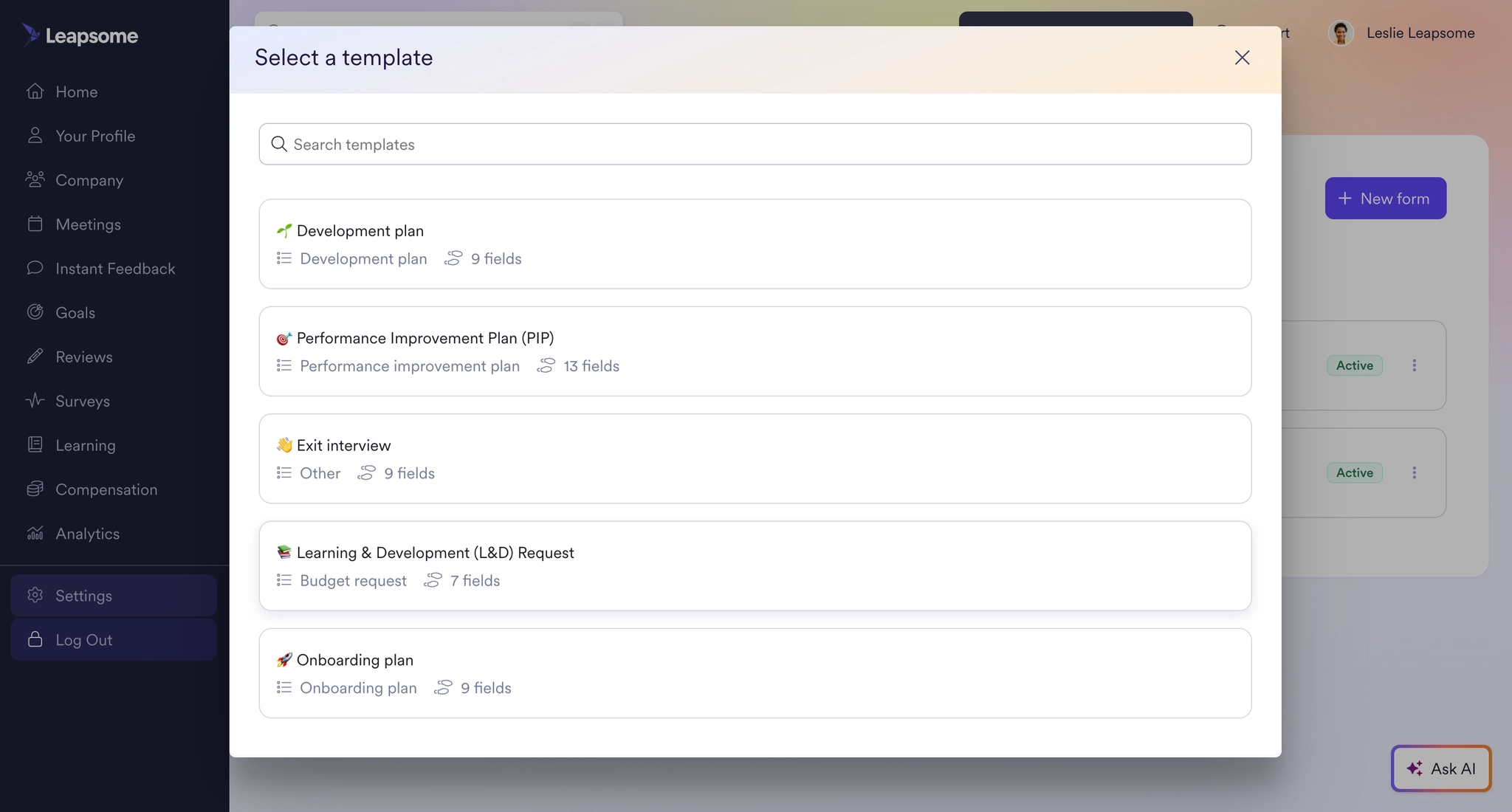
Form templates
Admins can now create forms using pre-built templates designed around common HR processes. These templates provide a structured starting point that can be customized as needed. By beginning with a template instead of a blank form, admins can configure new forms more quickly while maintaining consistency across processes. Templates also help standardize how information is collected across different workflows.
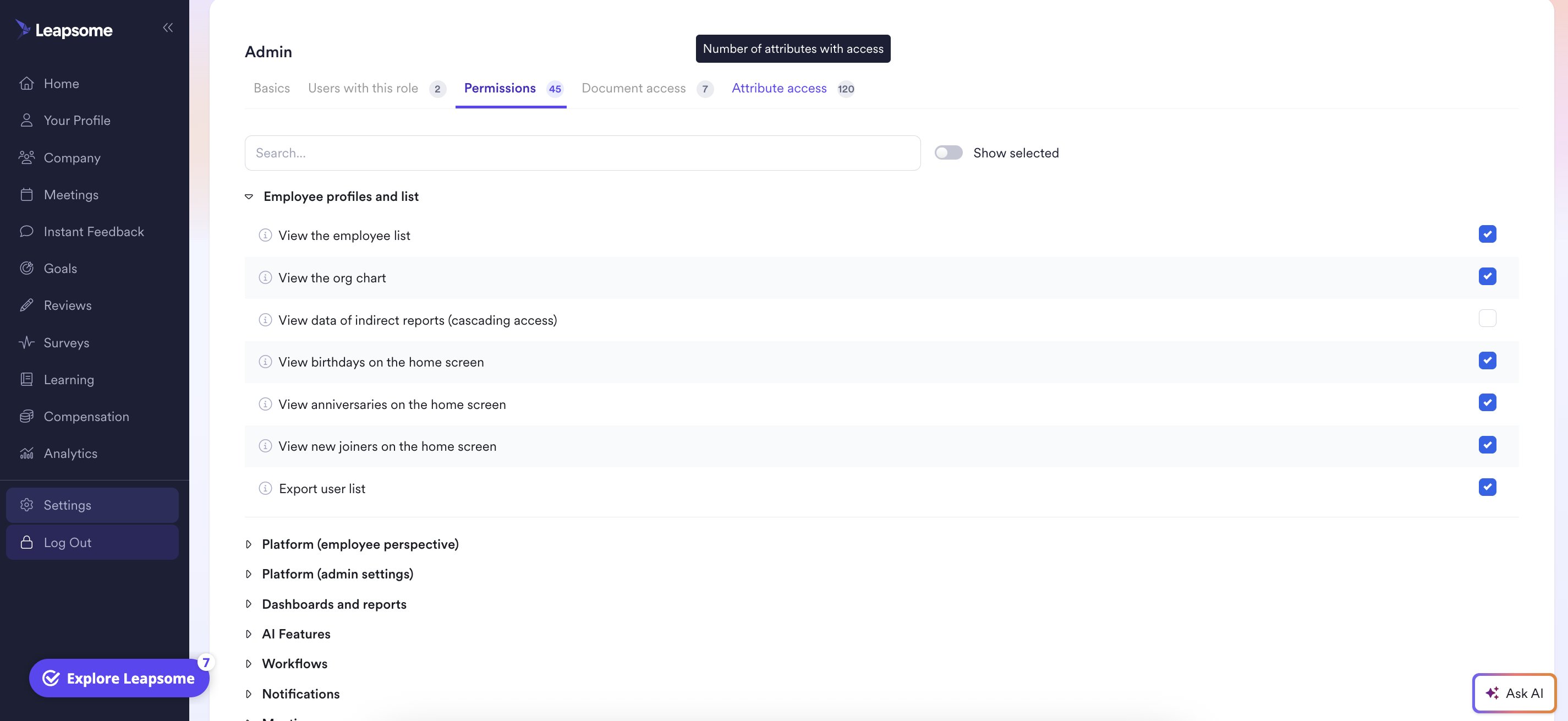
Manage access roles in a central place
Access roles can now be managed from a centralized permissions hub. This area allows administrators to view roles, adjust access levels, and control document visibility within a single interface.The hub provides a clear overview of roles, users, and permissions through organized tabs. This structure helps administrators review and update access settings without switching between multiple configuration areas.
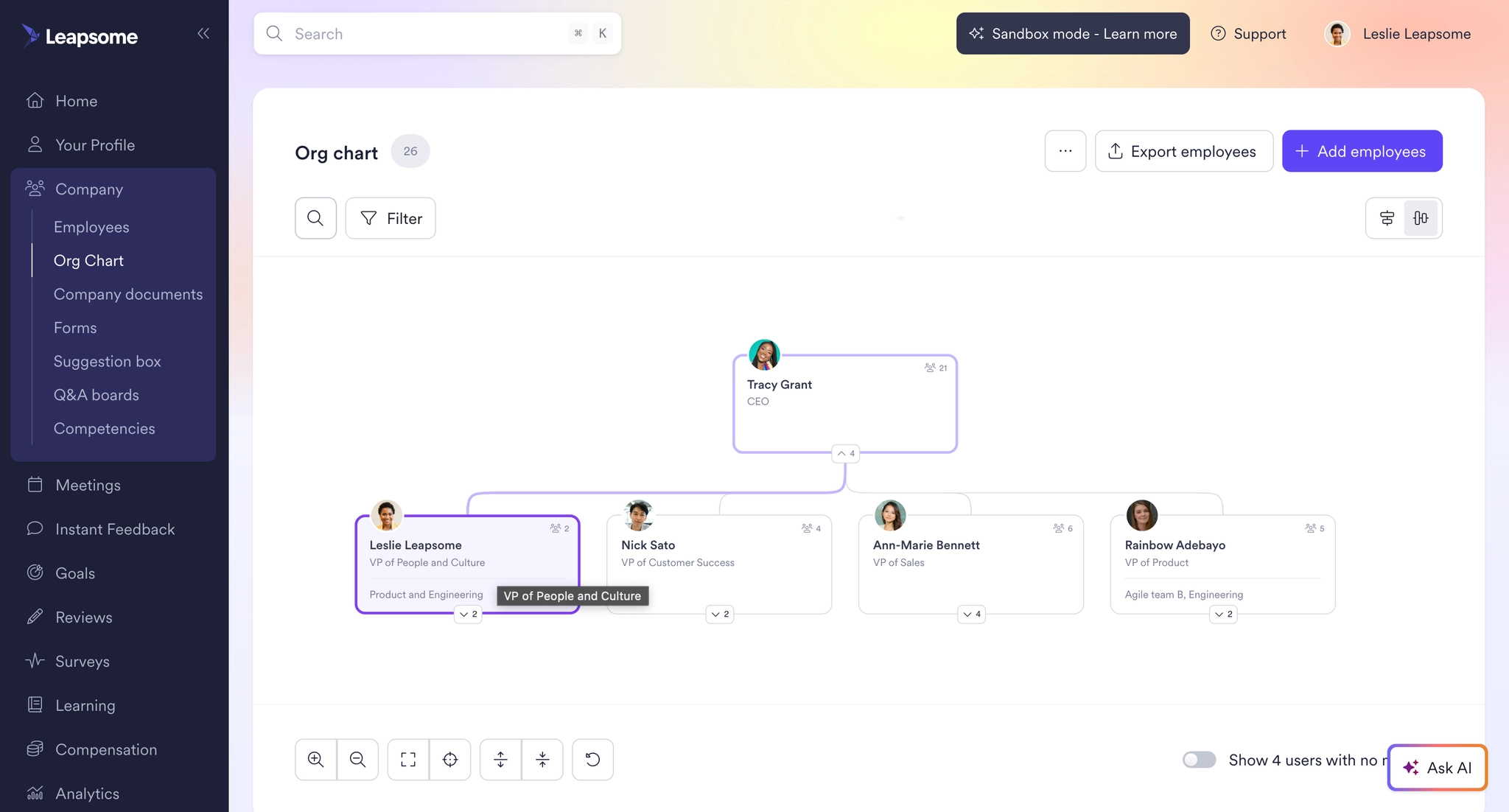
Org chart redesign and usability improvements
The org chart has been redesigned with several usability improvements. The updated version includes search functionality, zoom controls, and expandable views to help users navigate the structure of the organization more easily. Customizable employee attributes can also be displayed within the org chart, allowing organizations to tailor which details appear alongside each employee profile.These updates improve how users explore organizational structure and locate people within the company.
🗓️ Join our March product updates webinar
See the newest Leapsome features in action. Register here.
🌟 Want a sneak peek at what’s ahead?
Visit our public roadmap to see what we’re building next.
💡 Need support?
Reach out via the platform’s help button, contact form, or our Success Center.
🪄 Ready to simplify your HR operations?
Discover how Leapsome’s all-in-one platform helps you create scalable workflows, actionable insights, and a more connected employee experience.
👉 Book your personalized demo
Leapsome Team

%20(1).png)
.png)