HR case management: build a system that scales with your team
.png)
.jpg)
As your company grows, so does the volume and complexity of HR cases. At some point, you need a process and structure in place to ensure each case type follows a set workflow, nothing falls through the cracks, and you can prove to tribunals or compliance teams that you handled things properly.
This is the essence of HR case management, which helps you efficiently address employee questions and grievances, stay compliant even as regulations evolve, and prevent the need to repeatedly respond to the same issues.
Our research shows that 49% of employees say they lose trust when their feedback or concerns are ignored.* Therefore, by successfully implementing HR case management, you can also improve employee sentiment and engagement.
Use this guide to learn about:
- Our six-step framework for effective HR management
- How to get started with a 30-day pilot
- What tools to prioritise for a scalable system that’s audit-ready
- A simple checklist you can use when comparing HR software
🔗 Centralize your HR operations in one platform
Manage employee records, automate approvals, and connect to performance and engagement data in one system.
👉 Explore Leapsome HRIS
*Leapsome 2026 Workforce Trends Report
What is HR case management and why it matters
HR case management is the operational backbone for organizing, tracking, and resolving employee inquiries and issues through structured workflows instead of ad-hoc email chains and Slack threads.
It gives you one system to capture every case, assign the right owner, track progress against response targets, and surface the patterns that help you fix root causes.
Three signs your intake is fragmented
Here's what broken intake looks like:
Cases get lost between channels. Employees submit the same question twice because no one logged the first request. Managers and employees don't know who owns what or how long the resolution should take.
Sensitive ER cases leak into public spaces. Complaints appear in Slack threads or forwarded emails, creating privacy and compliance risk.
Urgent issues get buried. Payroll errors or safeguarding concerns sit in general inboxes. You're answering the same policy questions over and over because there's no knowledge base.
What a working system gives you
A well-functioning HR case management system consolidates every case in one secure location, making the full history easily accessible to the right people.
Instead of digging through emails or scattered documents, HR teams can see exactly what has happened and what needs attention. Urgent issues are directed to the correct owner immediately, as the system prioritizes cases and routes them based on role-based access.
This ensures that only Employee Relations (ER) or Legal personnel can view sensitive information. Every step is automatically timestamped, so when Compliance or a tribunal requests employee records, the team is already prepared.
Routine questions are handled through a searchable knowledge base, which reduces case volume and allows HR to focus on more meaningful work. And because the system integrates with your HRIS, it already understands your organizational structure and manager hierarchy, so routing and permissions occur smoothly without requiring extra manual effort.
How is HR-native software better than generic IT ticketing
IT ticketing tools treat every case like a password reset. They lack privacy controls, role separation for investigators, and people-outcome reporting.
On the other hand, when your case management system connects to your HRIS, it already understands your organizational structure and manager hierarchy. This means routing decisions to the right HR specialist and setting role-based permissions happens automatically, without manual configuration for each case.
This can be an important benefit in terms of HR compliance, since fast-changing compliance rules require policy versioning and audit logs. For example, the EEOC withdrew parts of its harassment guidance on May 15, 2025, requiring teams to quickly update their policies.
With a unified data from across your core HR processes, you can make quick, accurate decisions without compromising how you manage risk.
To learn more, see this two-minute walkthrough of how our HRIS centralizes people data.
The intake-to-resolution blueprint (a simple framework)
Every HR case, whether it's a benefits question or a formal grievance, follows the same basic path. This is your one framework for managing any employee issue from start to finish.
The six steps of HR case management
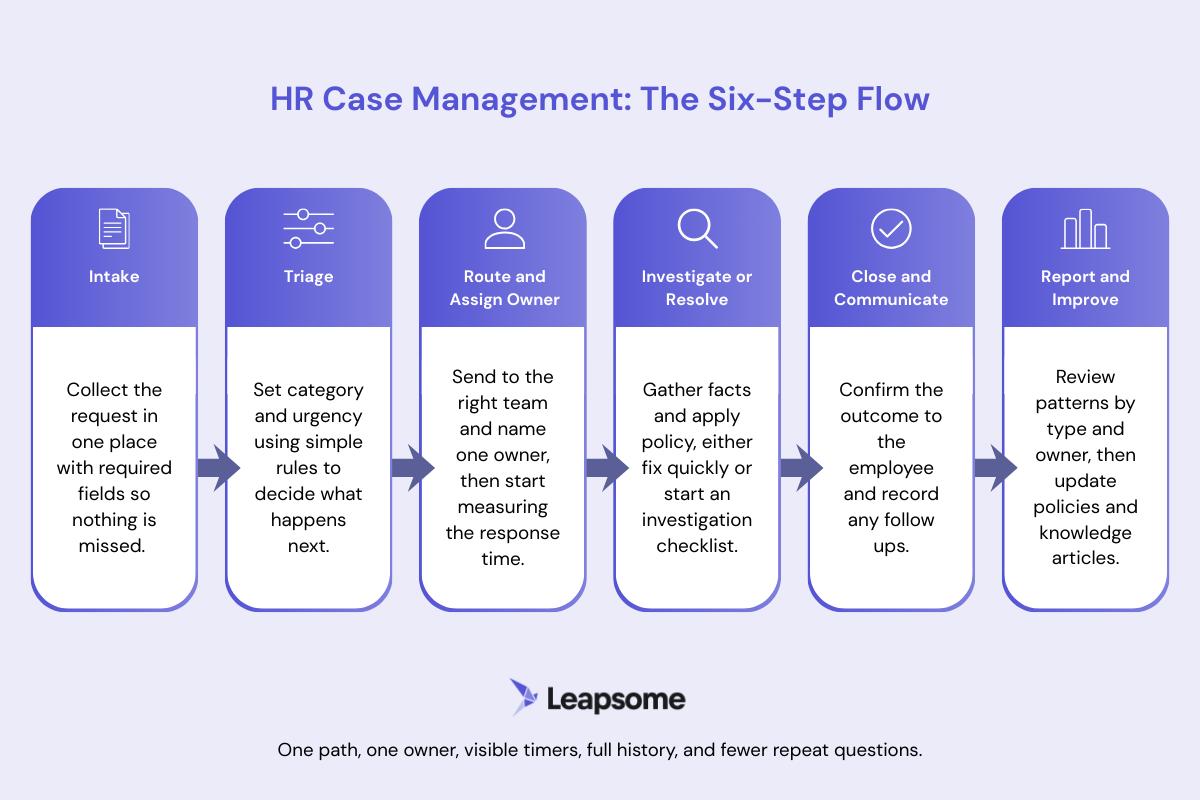
Here's the flow every case should follow:
1. Intake: collect the request through a form, self-service portal, email, or chat integration. Require fields like category, priority, description, and optional file upload so you capture everything needed to route and resolve the case without back-and-forth requests for information.
2. Categorize: assign category (benefits, grievance, investigation) and priority level (urgent, high, routine) based on clear rules. This determines the response target, the routing destination, and who has access, so every case follows the right workflow from the start.
3. Route and assign owner: send the case to the correct team based on category. HR Ops for benefits questions, Employee Relations for complaints, Legal for investigations. Assign a named owner so responsibility is clear, and start tracking response time against your service level agreement.
4. Investigate or resolve: the owner gathers facts, applies policy, consults stakeholders as needed, and makes a decision. For routine cases, this might take minutes; for investigations, it follows a formal checklist with documented evidence, interviews, and conflict checks.
5. Close and communicate: log the outcome, notify the employee of the decision and any next steps, and mark the case as resolved. Archive all documentation—intake form, communications, evidence, decision rationale—so you have a complete record if compliance or legal teams request it later.
6. Report and improve: review trends across case types, owners, and resolution times in dashboards. If a significant number of cases are the same policy question, publish a knowledge base article and create a new sub-category. Use this feedback loop to update policies, templates, and training to prevent repeat incidents.
With an all-in-one HRIS that holds your org structure and employee data, you can automate workflows, enforce role-based permissions, and track analytics without extra integration.
Match case types to response targets
When categorizing case types, you need a concise list of case types that accurately reflect your team and complexity. Vague categories, such as "general HR question," can stall routing and increase resolution time.
Here are three core categories that cover most cases, with typical time-frames for acknowledgment (e.g., "we've received your case and assigned an owner") and resolution (e.g., "we've investigated and communicated the outcome"):
- Benefits and payroll: enrollment questions, deductions, paycheck issues. The owner is HR Ops. These cases are normally acknowledged in less than a day and resolved within 48 hours.
- Complaints and grievances: formal employee complaints, workplace disputes. The owner is typically Employee Relations. These cases are often acknowledged within 24 hours and resolved in a few weeks.
- Investigations: harassment, discrimination, policy violations. The owner is often ER or Legal with restricted access. These cases are often acknowledged within 24 hours and resolved in a month.
When a formal complaint or investigation is opened, employment law requires you to document every step. If the case goes to a tribunal, you need proof you followed proper procedure.
Your investigation file should include the original intake record, a chronology of all actions with timestamps, interview notes from all parties, supporting documents like emails or performance records, your decision rationale, the outcome letter, and sign-offs from relevant stakeholders.
Without a documented process, tribunals are likely to rule the procedure unfair, even if your decision was correct. Build these requirements into your case management process:
- Conflict checks: verify the investigator has no reporting relationship or personal connection to either party
- Evidence completeness checklist: use a template to ensure you've gathered all required documentation
- Separation of roles: the investigator should be different from the decision-maker
- Timestamped audit trail: automatically log every action with date and time stamps
Use a knowledge base and track what matters
A knowledge base serves two purposes in case management. First, it answers employee questions before they become cases. Second, it gives your HR team consistent process documentation for handling each case type.
For employee-facing content, focus on your top repeat questions first. For internal documentation, create step-by-step guides for each major case category so any team member can handle cases consistently.
Cut repeat questions with self-service
A knowledge base built in tools like Notion or Confluence answers repeat questions before employees need to submit a case. At Leapsome, we use Notion to house our HR policies and FAQs, which helps deflect routine questions before they reach the HR team.
Focus on your top 10 most common questions first – topics like PTO policy, benefits enrollment, expense reimbursement, remote work guidelines, and parental leave. Then you can link to relevant articles directly in your intake form, so employees find their answer without submitting.
For example, if your form has a dropdown for "PTO question," you can include a prominent link to your complete PTO policy guide right next to that option.
Remember to track which questions keep coming through as cases even after you've published articles, as this tells you where your documentation is unclear or hard to find. This will help you continually improve the content.
Connect your HRIS to make routing smarter
For cases that aren't resolved by self-service, having your HRIS data accessible makes routing and resolution faster. When your case management system can reference employee data from your HRIS—like org structure, manager relationships, employment contracts, and leave history—you can route cases to the right person immediately.
For example, a benefits question gets routed to the HR Ops person who specializes in that area. A complaint about a manager goes to the HR Business Partner who supports that department. Role-based permissions align with your org structure, so only authorized users see sensitive cases.
You can also connect case themes to engagement, performance, and turnover data to identify root causes before they lead to attrition.
The three metrics that prove it's working
Focus on these metrics to keep on top of how well your system is working.
- Time-to-resolution: how long from case opened to case closed. Trend this by category to spot bottlenecks. If benefits cases take 5 days instead of 2, you need more capacity or a clearer policy.
- Repeat incidents: employees asking the same question multiple times signal unclear policy, missing knowledge base content, or poor first-contact resolution.
- Backlog: cases sitting open past their target date. If the backlog is growing, you need more capacity, better prioritization, or tighter SLA targets.
Review these weekly for operational health, and tie case themes to engagement signals monthly to spot friction early. You should also review your investigation cycle time and audit trail completeness every quarter to ensure that processes are being properly followed.
How to kick off your new case management process
A small, focused pilot is often the best way to implement a new process. Here’s how you can get started with your new case management framework.
A 30-day case management pilot
The fastest way to prove value is to start small with your two highest-volume case types, which are usually benefits/payroll questions and policy clarifications.
Week 1: Set up your intake
Create a simple intake form using Google Forms, Microsoft Forms, or your current ticketing tool (at Leapsome, we use Notion to house our HR policies and FAQs, which helps deflect routine questions before they reach the HR team.).
Include just four fields: category dropdown, priority level, description, and optional file upload. Share the form link in Slack, your intranet, or your knowledge base.
Week 2: Establish routing and owners
Assign specific owners to each category. For example, Paola handles benefits questions, Marco handles policy questions. Set simple response targets: acknowledge within one day, resolve routine cases within three days.
Week 3: Create your first knowledge base articles
Document answers to your top 5 repeat questions. Link these articles at the top of your intake form under "Check here first."
Week 4: Review and adjust
At the end of 30 days, review your metrics: How many cases did you receive? What was your average time-to-resolution? How many cases were duplicates or could have been answered by documentation? Where did things get stuck?
Use these insights to refine your categories, update your knowledge base, and adjust your response targets. Then add 1-2 more case types to your pilot.
This approach works with any tool, from a shared inbox to a full case management platform. As you scale, you can graduate to more sophisticated systems that integrate with your HRIS to automatically pull in employee context and org structure.
Quarterly tune-ups
Analyze case trends every quarter. If 30% of cases are "policy questions" but they're actually asking about the same three topics, publish dedicated knowledge base articles and create a new subcategory.
- Review response targets by category. If investigations consistently take 45 days instead of 30, adjust the target to match reality or add ER capacity.
- Update communication templates to reflect policy changes. This includes new parental leave rules, updated expense limits. Then log the change in your system with an effective date.
- Check compliance guidance regularly. Schedule quarterly checks to catch any changes to data retention rules or employee privacy requirements.
- Tie case themes to engagement survey results and turnover data to prioritize fixes that reduce friction and improve employee experience.
What to look for in a vendor: evaluation checklist
Use this checklist when comparing HR systems:
- HRIS integration – sync org structure, manager relationships, contracts, and leave data so your case management process has full employee context without manual data entry
- Centralized employee data – store all employee information in one secure location so case handlers can quickly access the context they need
- Document management – maintain a secure repository for storing investigation files, policy acknowledgments, and case-related documentation
- Workflows and approvals – automate routine HR processes with custom workflows and approval chains to ensure consistency
- Role-based permissions – control who can access sensitive employee information based on their role in the organization
With Leapsome HRIS, you can connect HR workflows to performance, engagement, and analytics data because it's all built on the same platform.
⚙️ Automate HR workflows in days, not months
With Leapsome HRIS, you can build approval workflows, enforce role-based permissions, and track analytics automatically because it's all on one platform.
👉 See how it works
Have a measurable impact with a new approach to HR case management
Centralizing intake and tracking cases by category enables you to shift from being reactive to providing proactive, data-driven support. Instead of hunting through email to find out who's handling a payroll error, you can see the case owner, response deadline, and full history in one place.
As a result, you get faster resolution, fewer repeat incidents, and stronger audit readiness when tribunals or compliance teams come knocking.
Your team spends less time on admin and more time on the work that actually improves employee experience. Employees receive answers more quickly and know where to turn when they need assistance.
✅ Stop firefighting, start fixing root causes
See how you can use Leapsome to automate HR workflows, connect employee data, and surface the insights that drive continuous improvement.
👉 Book a demo
FAQs about HR case management
How does HR case management software integrate with an HRIS platform?
Integration syncs your org structure, manager relationships, employee contracts, leave data, and payroll signals so the case system knows who reports to whom and who handles what.
When case management runs on the same platform as your HRIS, routing and permissions work without manual setup or middleware.
How can a self-service employee portal reduce HR case volume?
A self-service portal with a knowledge base answers repeat questions before they become cases. Employees see the answer before submitting, and you can easily track your solved-without-a-case rate to measure impact. This frees your team to focus on complex issues instead of repeatedly answering the same questions.
Should HR Ops and Employee Relations use the same case system?
Yes, but with different access levels. HR Ops handles benefits and payroll questions that don't need restricted access. Employee Relations manages complaints and investigations that only ER or Legal should see. Using one system means you get unified reporting and can spot patterns across case types, and role-based permissions keep sensitive cases locked down.
Sam Abrahams

.jpg)

.jpg)
.jpg)
.jpg)